 Onn TV Hacks Master Your Onn TV with Expert Guides, Hacks, & Apps
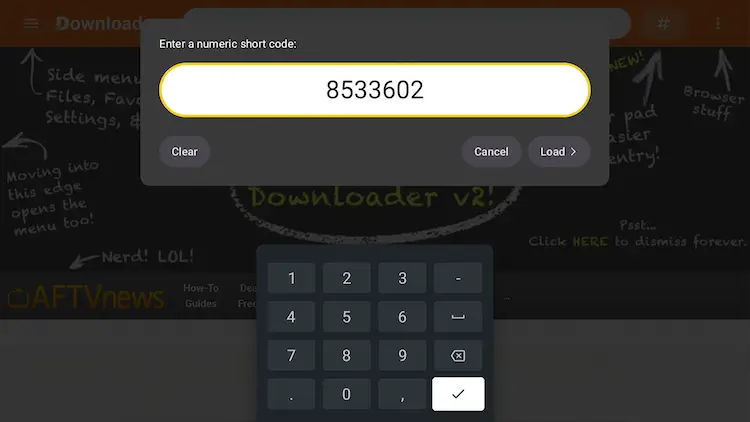
Quick answer: Search “VLC” directly in the Google Play Store on your Onn TV and tap Install, or Open the Downloader app, enter code 8533602, select IPTV Media Player, then choose VLC Media Player.
The Onn TV Box is one of the most affordable streaming devices you can buy in 2026, and it runs on a genuinely open Android TV ecosystem. Adding VLC Player turns it into a full-fledged, format-agnostic media player.
VLC is a free, open-source multimedia player developed by VideoLAN. It natively plays nearly all audio and video formats, making it essential for local playback and network streaming.
📋 Table of Contents
Our Top Pick for Onn TV
Surfshark VPN
One tap to protect your Onn TV. Unlimited devices. Built-in ad blocker. Under $2/month.
Get Surfshark — 87% Off Today →
Why Use VLC on an Onn TV?
VLC handles almost any media format without requiring extra codecs. This eliminates playback errors when opening unusual file types, giving you a seamless viewing experience on your television.
It natively supports hardware decoding, multi-track audio, and subtitles. Unlike most standard players, VLC can pull files directly from external USB drives and local network shares, so you’re getting the most out of your hardware.
How to Install VLC on Onn TV Box/Stick
METHOD 1Install VLC from the Google Play Store
VLC is available directly from the Google Play Store, making this the easiest installation method. No sideloading or APK downloads required.
Open Apps on your Onn TV home screen.

Open “Apps”
Search for VLC under “Search for apps and games.”

Search “VLC”
Tap Install and wait for the download to finish.
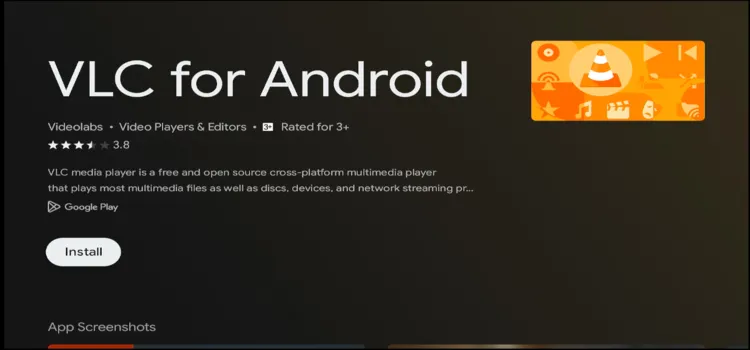
Tap “Install”
Tap Open to launch VLC.
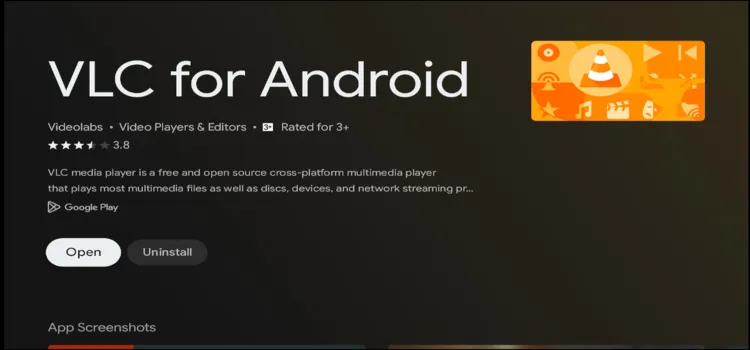
Tap “Open”
METHOD 2Sideload VLC APK Using Downloader
The Downloader app is the easiest way to sideload the official VLC APK onto your Onn TV Box or Onn TV Stick.
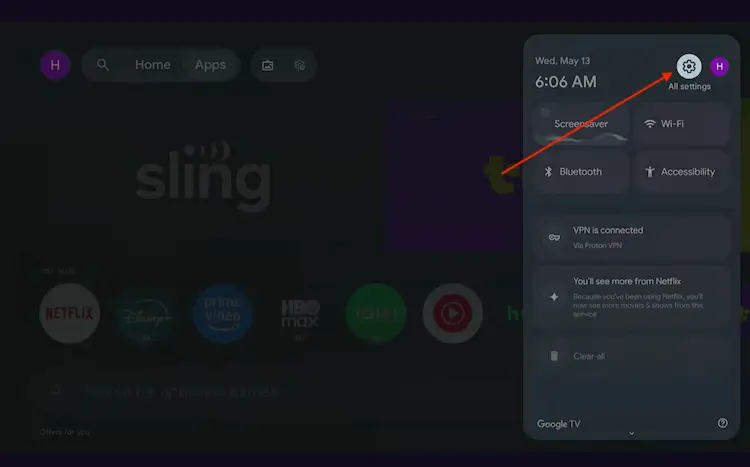
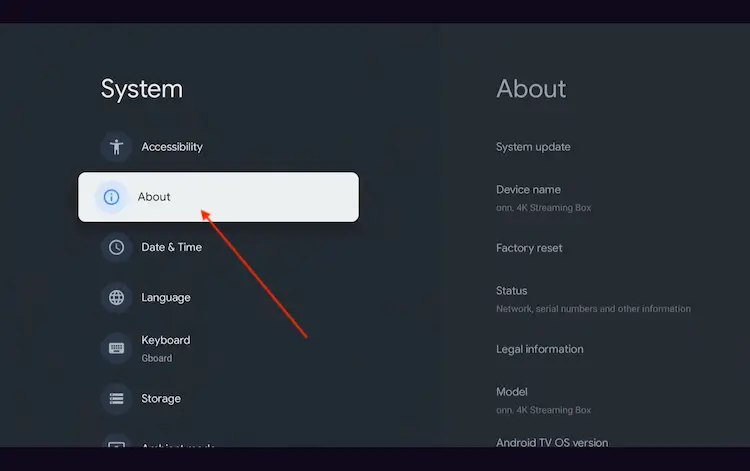
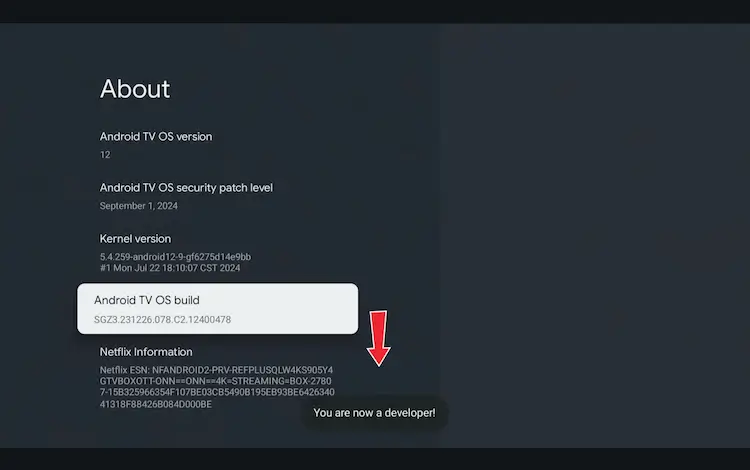
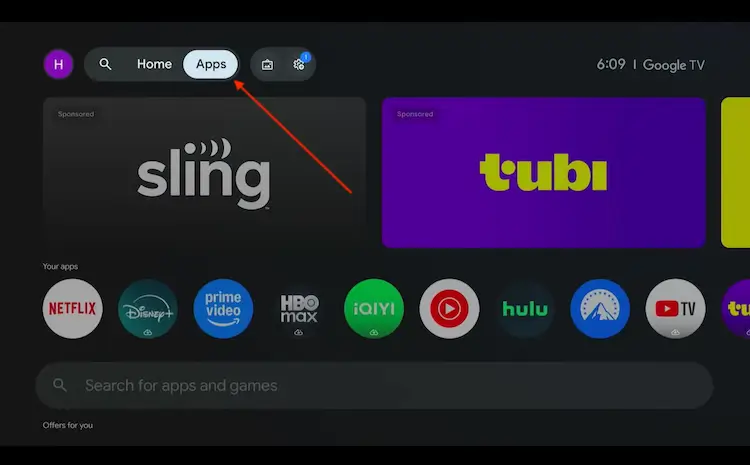
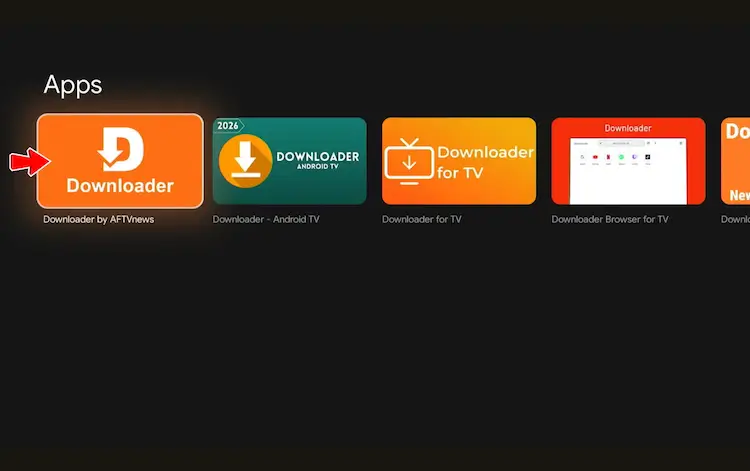
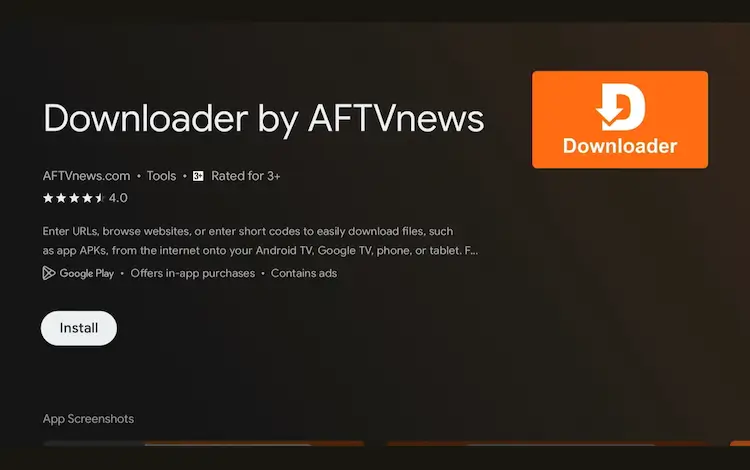
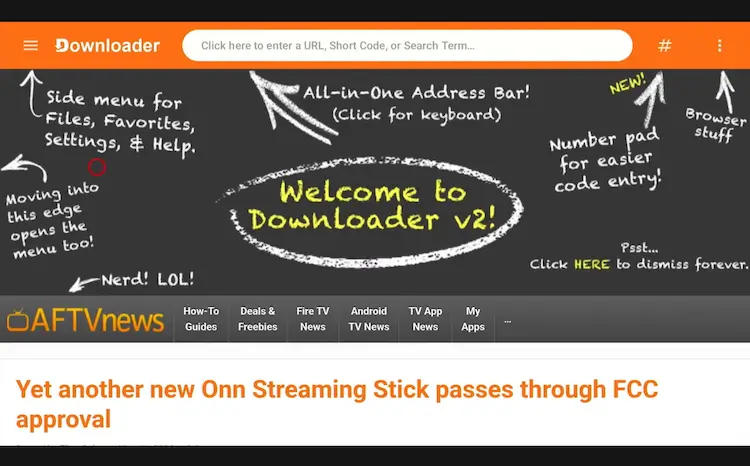
Go to Onn TV Home and then click on the Settings icon Settings icon on the Onn TV home screen Select All Settings All Settings icon Scroll down and select System, then choose About from the list. Navigate to System > About Scroll to the bottom and click Android TV OS Build 7 times continuously until a pop-up says "You are now a developer." Click Android TV OS Build 7 times to unlock Developer Mode Press the Home button on your remote, go to the top menu, and select Apps. Back to the Onn TV home screen > Apps Use the search bar and type Downloader and select the one at the top of the list Select the Downloader app at the top of the search results Click Install Press Install Once installed, open the Downloader app and click on the URL/search bar. Open Downloader app > URL Search bar Enter the exclusive Onn TV Hacks downloader code 8533602 below and press Go. Add the popular 8533602 code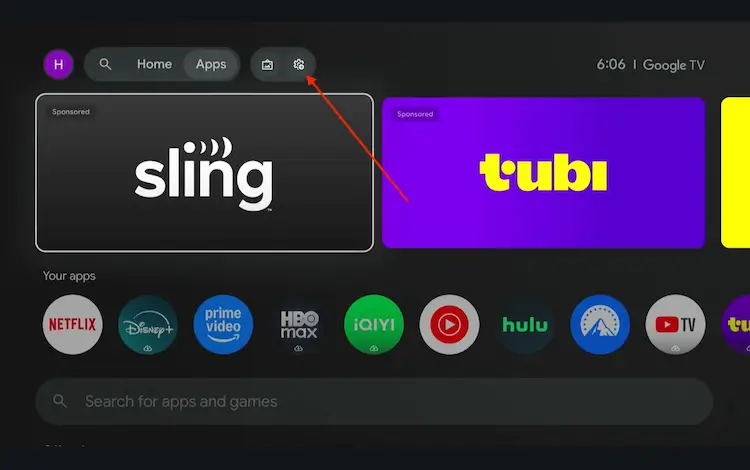
Tap “IPTV Media Player.”
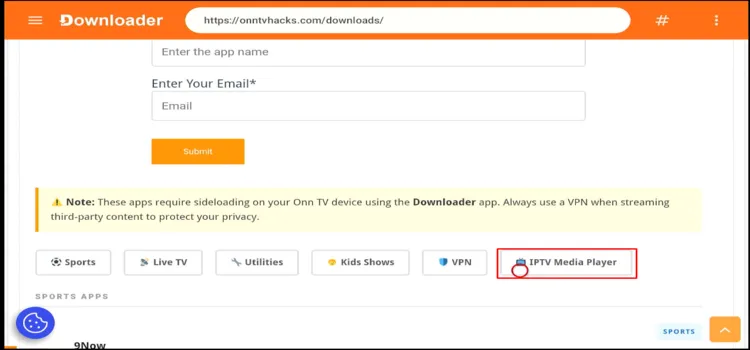
Tap “IPTV Media Player”
Scroll to VLC Media Player and tap Download.
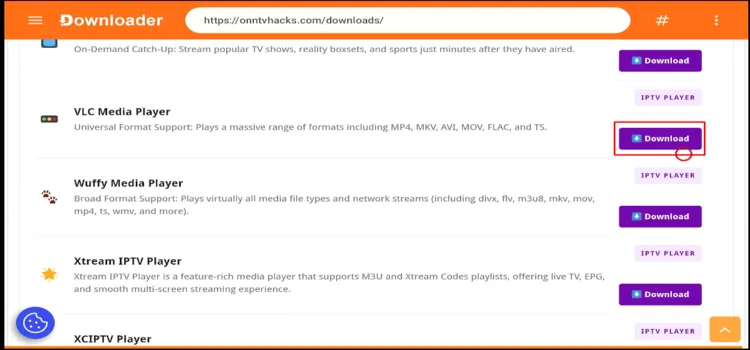
Scroll to “VLC Media Player” and tap “Download”
The download will begin automatically.

Download in progress
A status window will open — tap Install.
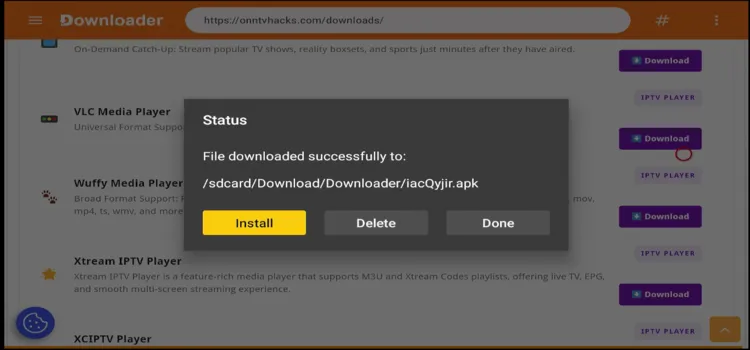
Tap “Install”
Once installed, tap Done.
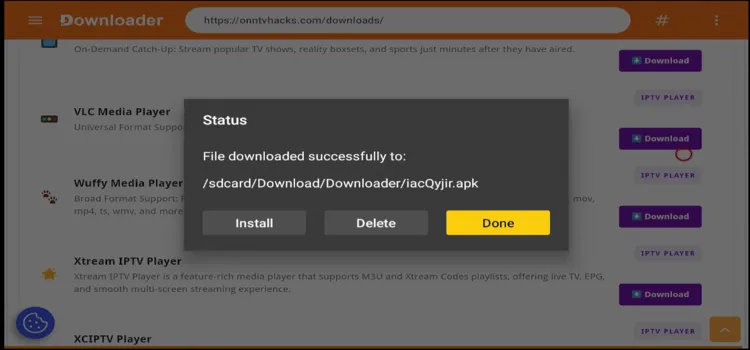
Tap “Done”
Tap Delete to remove the leftover APK file (this deletes the installer file only — not the VLC app itself).
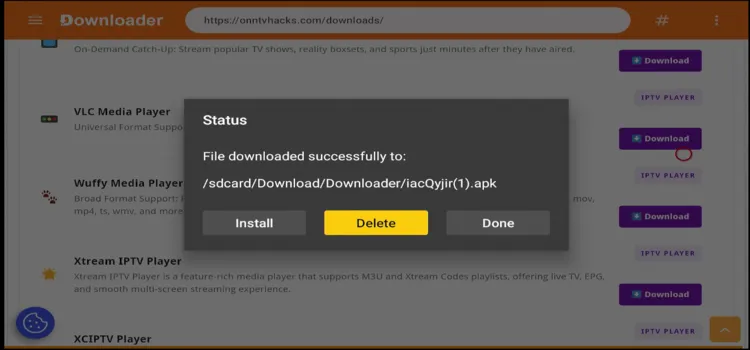
Tap “Delete”
A confirmation window will open — tap Delete again to confirm.
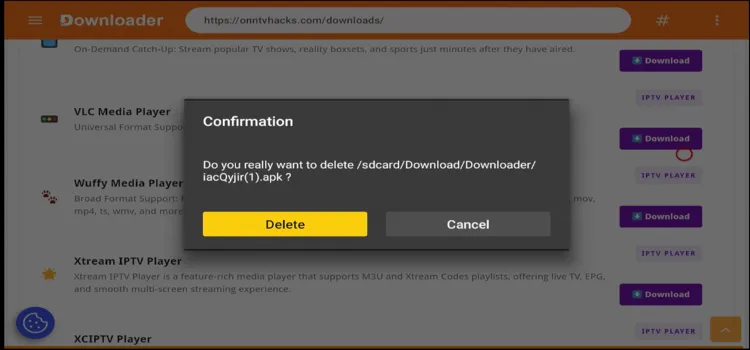
Confirm “Delete”
Press the Home button, then go to Apps and select VLC Media Player to launch it.
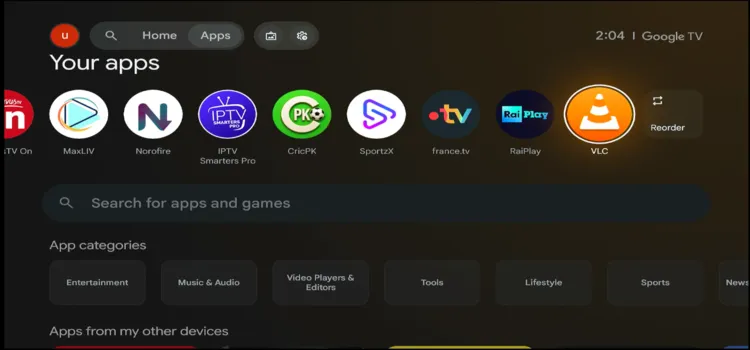
Press Home, then open VLC Media Player
How to Set Up VLC After Installation
A quick setup helps optimize your media library and improves overall playback.
After launching VLC, tap All File Access to grant permissions.
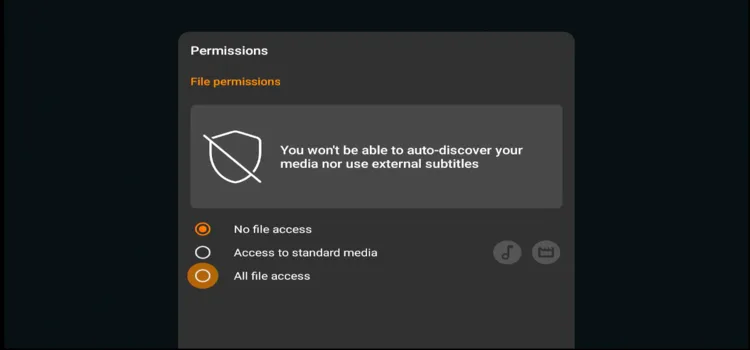
Grant “All file access”
Toggle VLC to “ON” in the permissions list.

Toggle VLC “ON”
Scroll to Other.
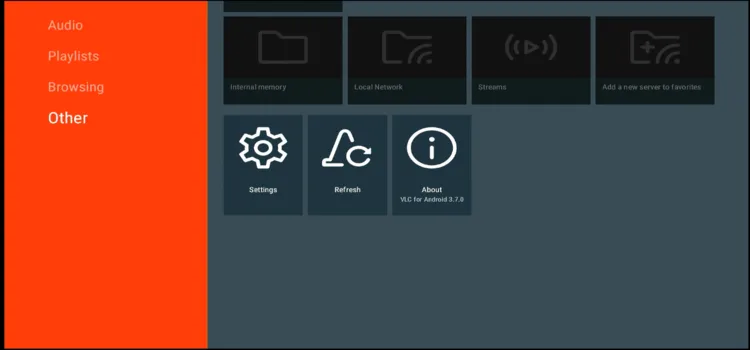
Scroll to “Other”
Tap Settings.
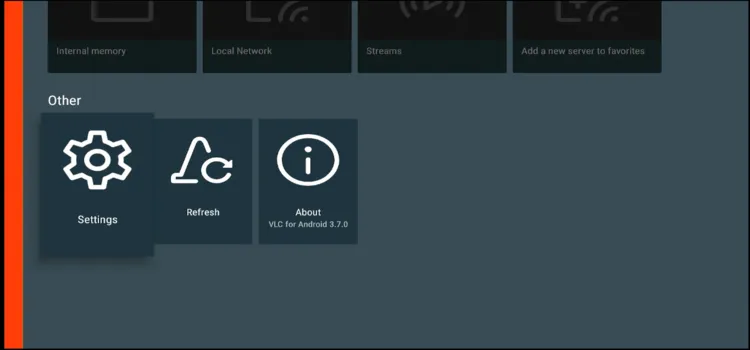
Tap “Settings”
Enable Auto Rescan.

Enable “Auto Rescan”
Get Surfshark — 87% Off Today →
Tips for Better VLC Performance on Onn TV Box/Stick
These optimization tips help deliver the best streaming performance.
| Tip | Description |
|---|---|
| Enable Hardware Acceleration | Turn on hardware acceleration for smoother 4K playback and lower CPU usage. In VLC, go to: Other > Settings > Hardware Acceleration |
| Increase Network Caching | If streams buffer, increase network caching. Pairing a VPN like Surfshark can also help reduce ISP throttling. In VLC, go to: Other > Settings > Advanced > Network Caching Value |
| Optimize Local Playback | The Onn 4K Pro uses USB 2.0, so stream very large files over a local network share instead of a USB drive for better speed. |
| Clear App Cache | Regularly clear the VLC cache through Onn TV Settings to improve responsiveness and free up memory: Quick Settings > All Settings > System > Storage > Internal shared storage > Apps > VLC > Clear Cache > OK |
Common VLC Installation Problems and Fixes
Most VLC installation issues on the Onn TV Box come down to storage limits, permissions, or an interrupted download. Here’s how to fix the most common ones.
| Problem | Fix |
|---|---|
| Install Fails from Downloader | Check your internet connection and confirm Unknown Sources is enabled for the Downloader app, then retry. |
| “App Not Installed” Error | Free up storage space on your Onn TV, or remove a conflicting older VLC version before reinstalling. |
| VLC Crashes on Launch | Clear the app cache through Onn TV Settings, or reinstall VLC from the Google Play Store. |
| Stuck on Downloading Screen | Restart the Onn TV Box and re-enter the Downloader code to restart the install. |
VLC vs Other Media Players for Onn Stick/Box
Here’s how VLC compares to other popular media players so you can pick the right one for your streaming needs.
| Feature | VLC Player | MX Player | Kodi |
|---|---|---|---|
| Cost | 100% Free | Free with Ads | 100% Free |
| Format Support | Universal | Excellent | Universal |
| Network Streaming | Built-in | Limited | Highly Advanced |
| Ease of Use | Very Simple | Moderate | Complex |
FAQs
Q Is VLC free on Onn TV Box?
Yes. VLC is completely free, open-source, and has no ads or hidden purchases.
Q Can VLC play 4K videos on Onn TV?
Yes. VLC supports 4K playback, especially with hardware acceleration enabled.
Q Why isn’t VLC detecting files on my USB drive?
This usually happens when the drive isn’t formatted correctly, or storage permissions are missing. Format the drive as FAT32 or exFAT and allow access when VLC prompts you.
Q Does VLC require external codecs?
No. VLC includes nearly all audio and video codecs built in, so additional downloads are rarely needed.
Q Is a VPN required when using VLC?
Yes, if you’re streaming from unverified services. A premium VPN like Surfshark helps protect your IP address, bypass geo-restrictions, and reduce ISP throttling.
Final Thoughts
VLC Player remains one of the best free media players for the Onn TV Box/Stick in 2026. Its universal format support, hardware acceleration, and built-in codec compatibility deliver smooth playback without needing any extra software.
For better privacy and streaming performance, Surfshark VPN is our recommended choice can help protect your online activity, bypass geo-restrictions, and reduce ISP throttling for a smoother experience.
