 Onn TV Hacks Master Your Onn TV with Expert Guides, Hacks, & Apps
Streaming on Onn TV without a VPN means your ISP can see everything, and will throttle it. Surfshark fixes that, and it’s our top pick from the best VPNs for Onn TV.
It runs natively on Google TV and Android TV, covers unlimited devices, and starts at just $2.49/month, making it the best-value VPN for your ONN device.
📋 Table of Contents
Our Top Pick for Onn TV
Surfshark VPN
One tap to protect your Onn TV. Unlimited devices. Built-in ad blocker. Under $2/month.
Get Surfshark — 87% Off Today →
Quick Overview
Before getting into the install steps, here’s the short version of what you’re getting:
| 📱 Platform | Google TV / Android TV (Android 6.0+) |
| 📺 Onn Models Supported | Onn 4K, Onn 4K Plus, Onn 4K Pro (2024/2026) |
| 📥 Install Method | Downloader app or Google Play Store |
| 💰 Price | Starts from $2.49/month |
| 🆓 Free Trial | 7-day free trial available |
| ↩️ Money-Back Guarantee | 30 days |
| 🌍 Servers | 4,500+ servers in 100 countries |
| 🔐 Protocols | WireGuard, IKEv2, OpenVPN (UDP/TCP) |
| ♾️ Devices | Unlimited, on every plan |
Installing Surfshark via Downloader App
Surfshark VPN is currently not available on the Google Play Store, which is why you have to install it through the Downloader app like most apps.
Here are the steps you need to follow:
Go to Onn TV Home and then click on the Settings icon
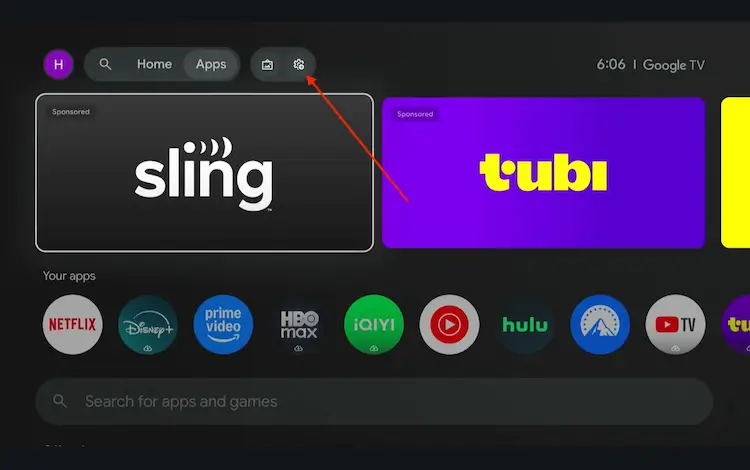
Settings icon on the Onn TV home screen
Select All Settings
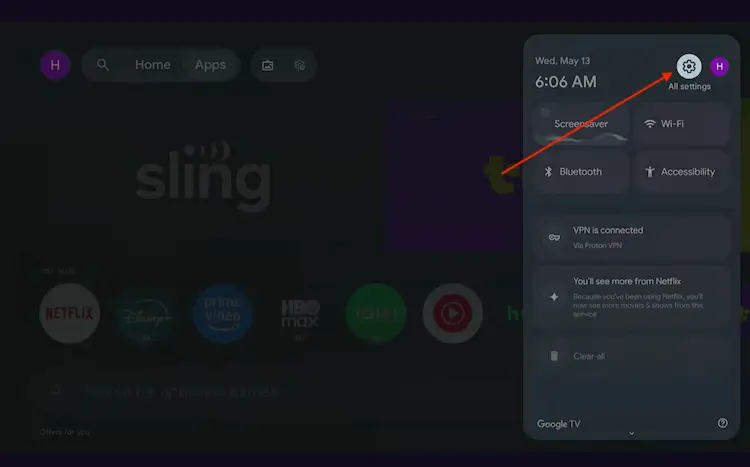
All Settings icon
Scroll down and select System, then choose About from the list.
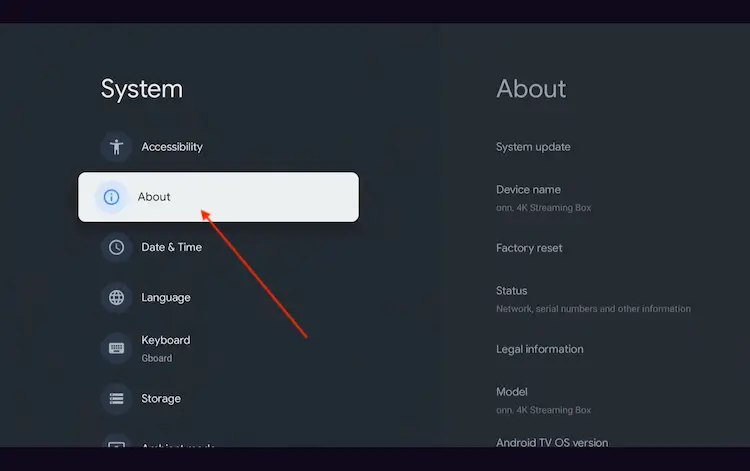
Navigate to System > About
Scroll to the bottom and click Android TV OS Build 7 times continuously until a pop-up says "You are now a developer."
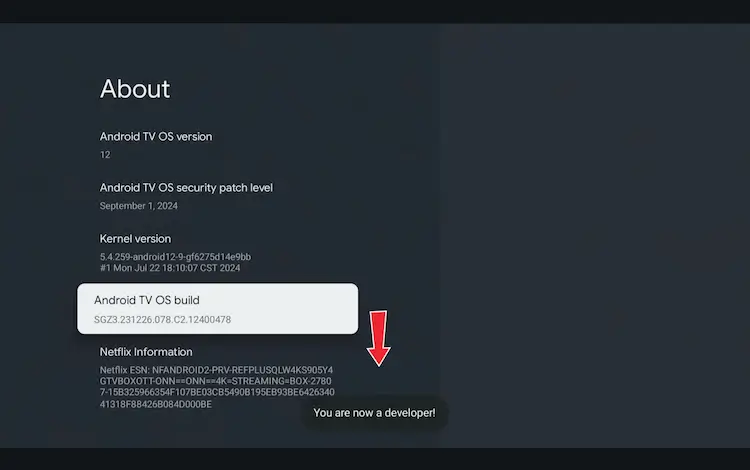
Click Android TV OS Build 7 times to unlock Developer Mode
Press the Home button on your remote, go to the top menu, and select Apps.
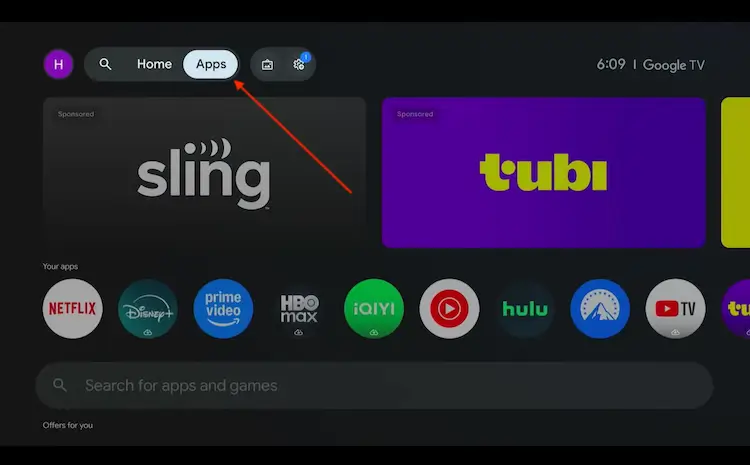
Back to the Onn TV home screen > Apps
Use the search bar and type Downloader and select the one at the top of the list
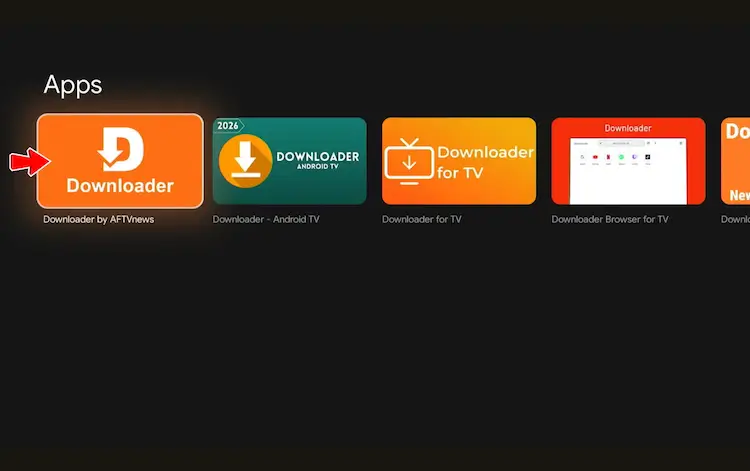
Select the Downloader app at the top of the search results
Click Install
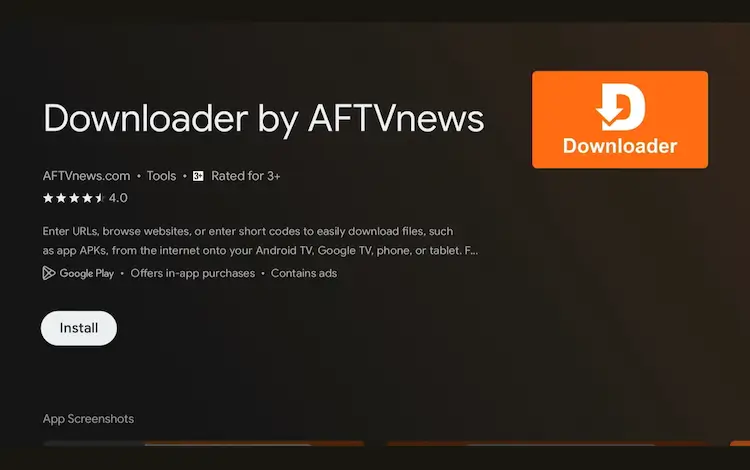
Press Install
Once installed, open the Downloader app and click on the URL/search bar.
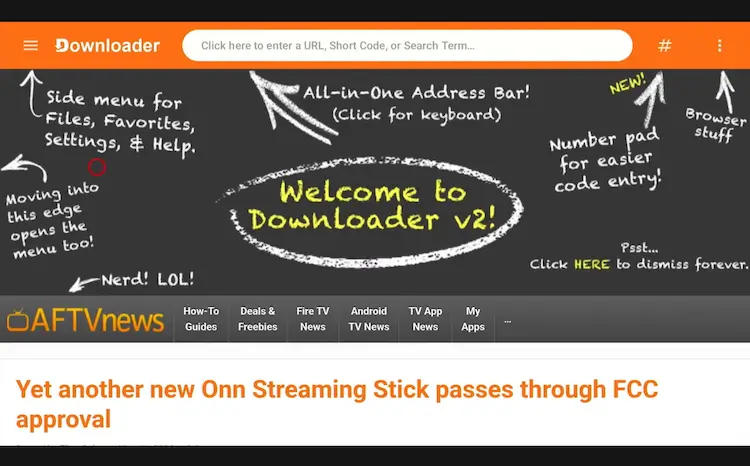
Open Downloader app > URL Search bar
Enter the exclusive Onn TV Hacks downloader code 8533602 below and press Go.
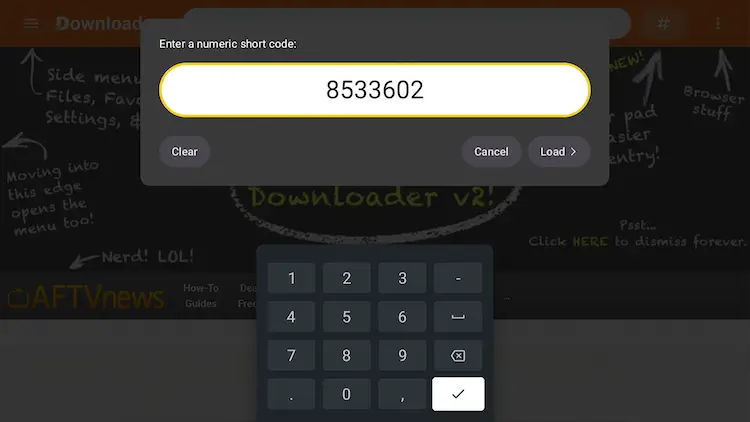
Add the popular 8533602 code
|
10 |
Scroll down and click on the ‘VPN’ button |
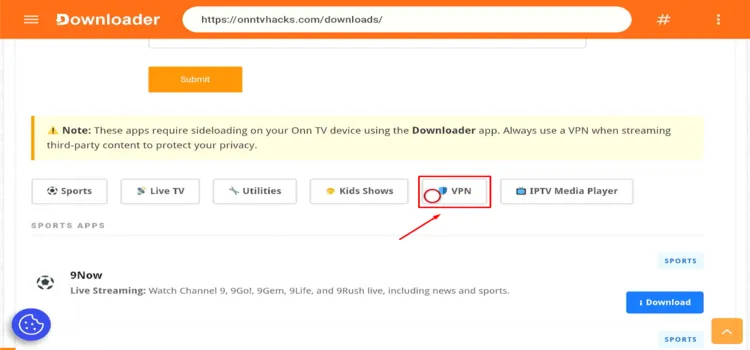
Click on the ‘VPN’ button
|
11 |
Find Surfshark and click Download |
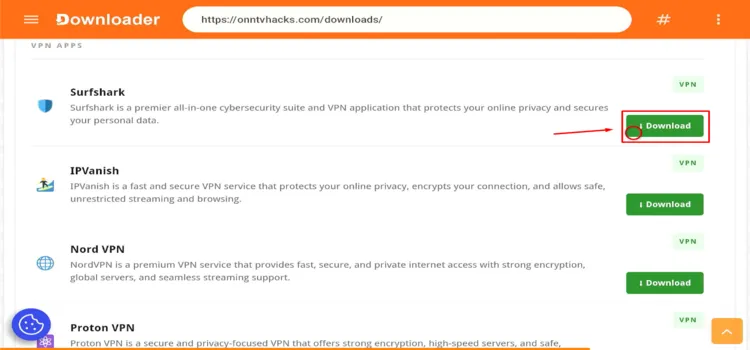
Spot ‘Surfshark’ and Click on ‘Download’
|
12 |
Surfshark will start downloading |
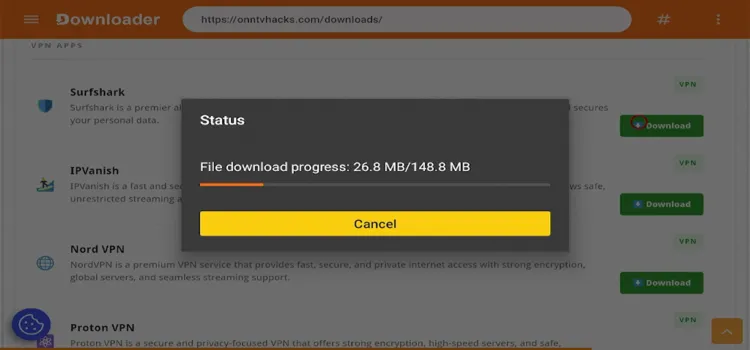
Surfshark will start downloading
|
13 |
A status window will open. Click Install |

Click ‘Install’
|
14 |
A small window will open asking for a file to install. Click Install |

A small window will open, click on ‘Install’
|
15 |
After Surfshark has been installed, click Done. |
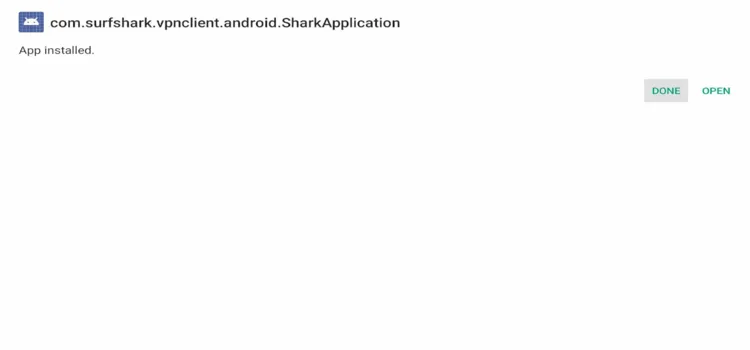
Click on ‘Done’
|
16 |
A dialogue box will open once again. Click Delete. |
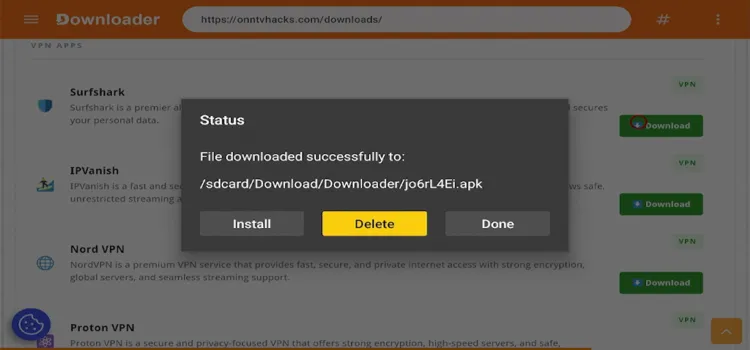
Click ‘Delete’
|
17 |
A confirmation window will open. Click Delete |
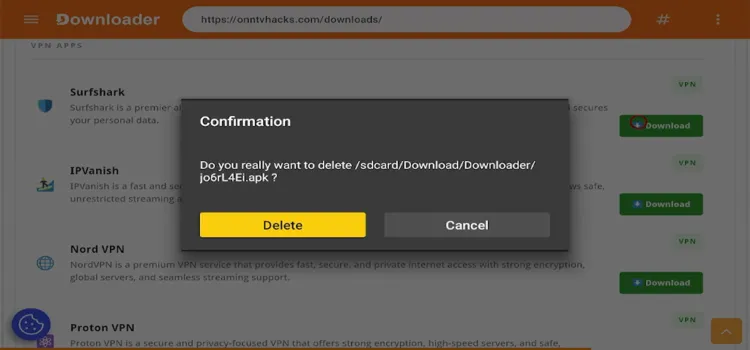
A ‘confirmation window’ will open, click on ‘Delete’
|
18 |
Go to Apps / Your Apps and click on Surfshark to launch the app. |
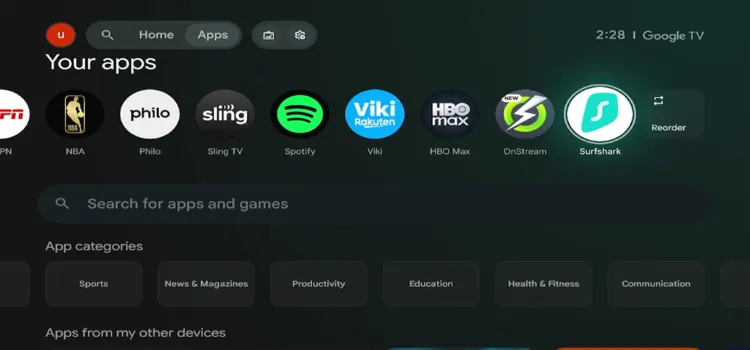
Click on ‘Surfshark’ app
Get Surfshark — 87% Off Today →
Key Surfshark Features on Onn TV Box
Have a look at some of the features offered by Surfshark VPN:
| Feature | What It Does |
|---|---|
| 🎮 Remote-Friendly UI | Optimized for D-pad navigation — no awkward menus or tiny text. |
| ⚡ 10 Gbps Servers | High-speed servers built for smooth 4K and IPTV streaming. |
| 🛑 Kill Switch | Cuts internet if the VPN drops — prevents accidental IP exposure. |
| 🧹 CleanWeb | Blocks ads, trackers, and malware across every app. |
| 🔀 Bypasser | Split tunneling — choose which apps route through the VPN. |
| ♾️ Unlimited Devices | Protect every device you own on a single subscription. |
| 📌 Dedicated & Static IP | Optional static IP for services that require a consistent address. |
| 🔁 MultiHop | Routes traffic through two VPN servers for extra privacy. |
| 🎭 Camouflage Mode | Obfuscates VPN traffic so it looks like regular browsing. |
| 🌐 NoBorders Mode | Keeps connections stable on restrictive networks. |
| 🔍 No-Logs Policy | Independently audited — Surfshark doesn’t store your activity. |
How to Optimize Settings for Surfshark on ONN TV Box?
After installing, adjust these settings inside the Surfshark app for the best IPTV streaming experience on your ONN TV Box.
1Enable Kill Switch
Go to Settings > VPN Settings > Kill Switch and turn it ON. This blocks all traffic if the VPN connection drops, preventing any accidental IP exposure on live streams.
2Choose the Right Protocol
Tap Settings > Protocol and choose what suits you best. For IPTV streaming, WireGuard delivers the best speed and stability. Use IKEv2 as a fallback on congested networks.
3Use Bypasser (Split Tunneling)
Bypasser routes specific apps through the VPN. Run your IPTV player through Surfshark while other apps connect normally. Set it up under Settings > VPN Settings > Bypasser.
4Enable CleanWeb
Enable CleanWeb to block ads and trackers. It works across all streaming apps on your ONN box and reduces unnecessary bandwidth usage during live TV. Find it under Settings > VPN Settings > CleanWeb.
Pricing Plans — Which One Should You Pick?
All three tiers have the same VPN core — same servers, same speed. Only the bundled extras differ.
| Plan | 24mo + 3 Extra | 12mo + 3 Extra | 1 Month |
|---|---|---|---|
| Surfshark Starter | $2.49/mo | $3.39/mo | $16.45/mo |
| Surfshark One | $2.79/mo | $3.59/mo | $18.95/mo |
| Surfshark One+ | $4.49/mo | $7.49/mo | $21.85/mo |
Starter — the VPN alone, including everything covered above. This is the one to get for an Onn TV Box.
One — adds antivirus + breach alerts. Useful for your phone or PC, but does nothing for a TV box.
One+ — adds data removal from broker sites. Most expensive, not worth it for this use case alone.
Recommendation: Starter, 24-month plan, $2.49/month. Unlimited devices means it also covers your phone and laptop. Backed by a 7-day trial and 30-day money-back guarantee.
Get Surfshark — 87% Off Today →
FAQ’s
Q Does Surfshark work on the ONN TV Box?
Yes. Surfshark has a native app on the Google Play Store that works on all ONN Google TV boxes running Android 6.0 or later. The 2026 ONN 4K Pro on Android 14 is fully supported.
Q Can I use Surfshark for free on ONN TV Box?
Surfshark does not have a permanent free plan. However, it offers a 7-day free trial and a 30-day money-back guarantee. You can test the full service risk-free before committing.
Q Which Surfshark protocol should I use for IPTV streaming?
Use WireGuard for the best speed and lowest latency. It is the most efficient protocol in the Surfshark Android TV app and is ideal for 4K IPTV streams.
Q Does Surfshark support Ethernet on ONN TV Box?
Yes. Surfshark fully protects your ONN TV Box on both Wi-Fi and Ethernet. The app creates a system-wide VPN tunnel, keeping your streaming private, encrypted, and shielded from ISP throttling on any network setup.
Final Thoughts
Surfshark VPN is our top choice for ONN TV Box. Its setup is clean, the app is optimized for TV navigation, and the Kill Switch works properly — unlike many VPNs that skip this on Android TV.
For IPTV users, the combination of 4,500+ servers, WireGuard protocol, and ISP throttling protection makes Surfshark one of the most practical VPN choices in 2026. The ONN 4K Pro (2026) on Android 14 handles the app without any performance issues.
At $2.49/month on the 2-year plan with a 7-day free trial and 30-day money-back guarantee, Surfshark is a low-risk, high-value VPN for any ONN TV Box user who wants private, buffer-free streaming.
