 Onn TV Hacks Master Your Onn TV with Expert Guides, Hacks, & Apps

Kodi is a free, open-source media player that runs fully on the Onn TV Box. Whether your device runs Android TV or Google TV, Kodi is 100% compatible.
You can install it using two methods: the Downloader app or directly from the Google Play Store.
Before streaming on Kodi, protect yourself with a premium VPN. Surfshark VPN is our top choice It’s especially useful for live sports streams and third-party add-ons.
Key Takeaways
●
The easiest way to install Kodi is directly from the Google Play Store, no sideloading required.
●
For the latest official build, use the Downloader app to sideload Kodi directly from kodi.tv.
●
Always download the ARM 64-bit version, it’s the correct build for all current Onn TV Box models.
●
Kodi is 100% legal — but the legality of streaming depends entirely on which add-ons and sources you use.
📋 Table of Contents
Our Top Pick for Onn TV
Surfshark VPN
One tap to protect your Onn TV. Unlimited devices. Built-in ad blocker. Under $2/month.
Get Surfshark — 87% Off Today →
What You Need Before Installing Kodi
Before you start, make sure you have everything ready. Missing these requirements will prevent the installation on your Onn TV Box.
| Requirement | Details |
|---|---|
| 📶 Wi-Fi Connection | At least 15 Mbps recommended |
| 👤 Google Account | Must be signed in to the Google Play Store |
| 🔓 Unknown Sources | Must be enabled for sideloading via Downloader |
| 📥 Downloader App | Required for Method 2 (sideloading the APK) |
| 🔗 Kodi APK URL | kodi.tv/download |
Video on How to Install Kodi on Onn Device
Here’s a quick video tutorial on how to install Kodi on your Onn TV device:
How to Install Kodi on Onn TV Box
Google Play Store
Kodi is available directly on the Google Play Store, making this the easiest install method. No sideloading or APK downloads needed.
Press the Home button on your remote and click on Apps.
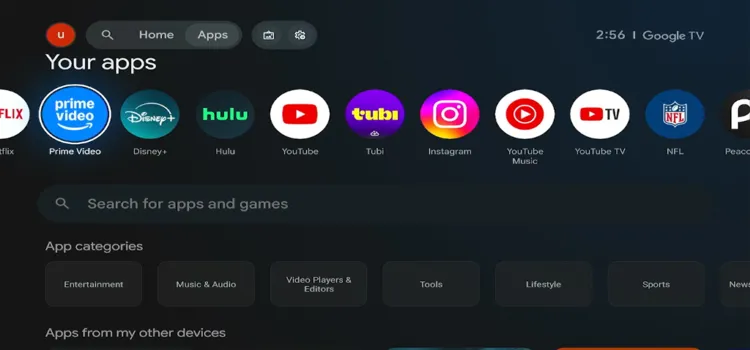
Press ‘Home’ and click on ‘Apps’
Under App categories, select Video Players & Editors.

Under ‘App Categories’, click on ‘Video Players & Editors’
Scroll and select Kodi.
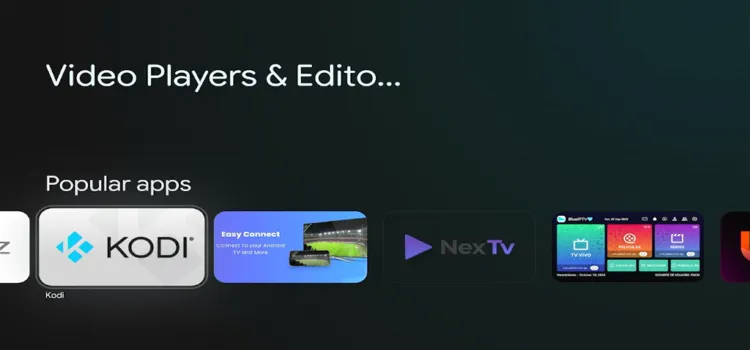
Scroll and select ‘Kodi’
Click Install.
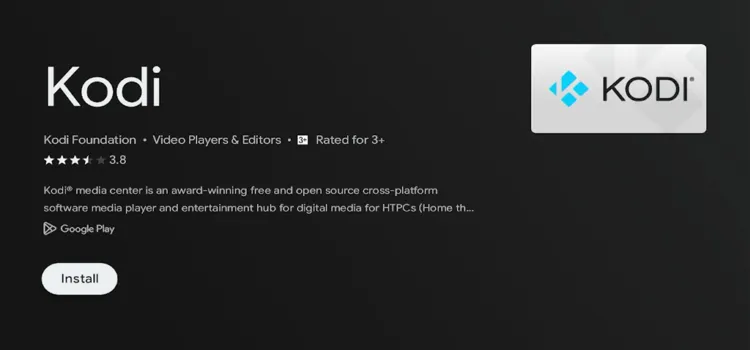
Click ‘Install’
Your Kodi player will start downloading and installing.
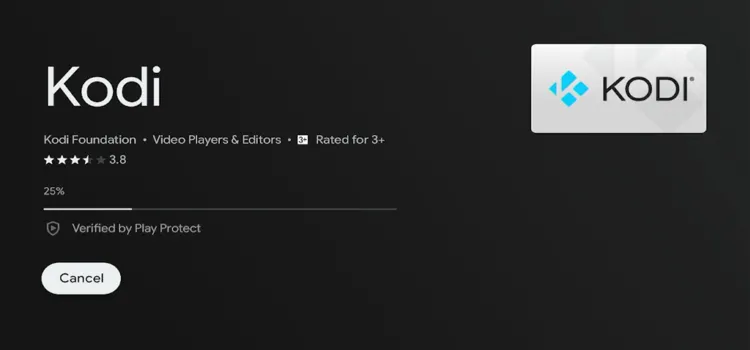
Your player will start downloading and installing
Press Home, go to Apps → Your Apps → Kodi, and launch the player.
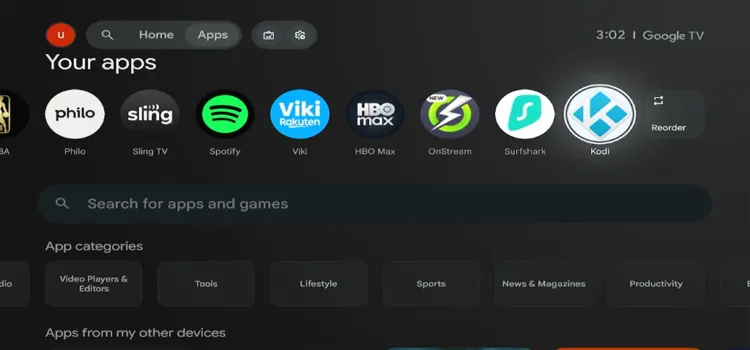
Go to ‘Apps/Your Apps/Kodi’ and launch the player
Note: The Play Store version may lag slightly behind the latest release on kodi.tv. If you need the newest version, use Method 2 below.
Downloader App
The Downloader app is the most reliable way to install Kodi on an Onn TV Box. It lets you sideload the official Kodi APK directly from kodi.tv without needing a PC.
If you haven’t jailbroken your Onn TV yet or don’t have the Downloader app installed, follow the steps below first:
Go to Onn TV Home and then click on the Settings icon
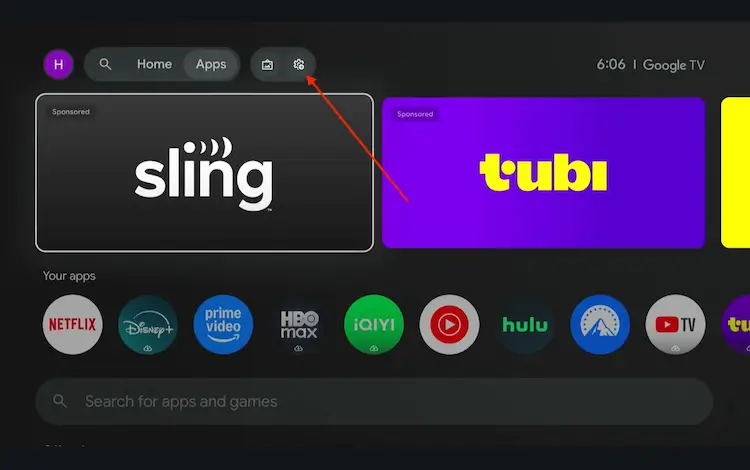
Settings icon on the Onn TV home screen
Select All Settings
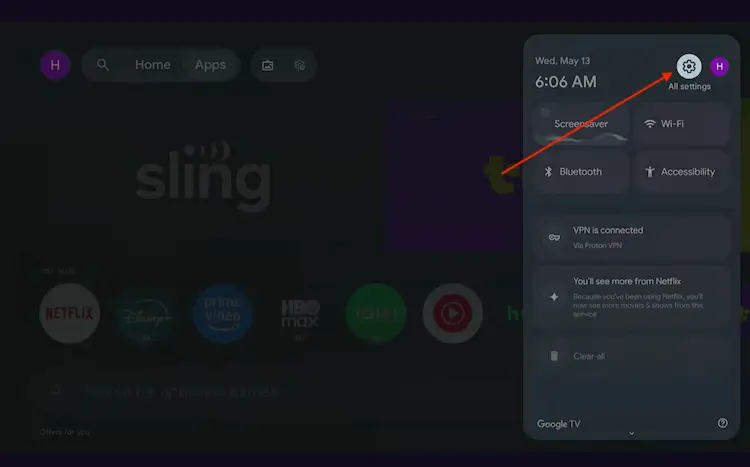
All Settings icon
Scroll down and select System, then choose About from the list.
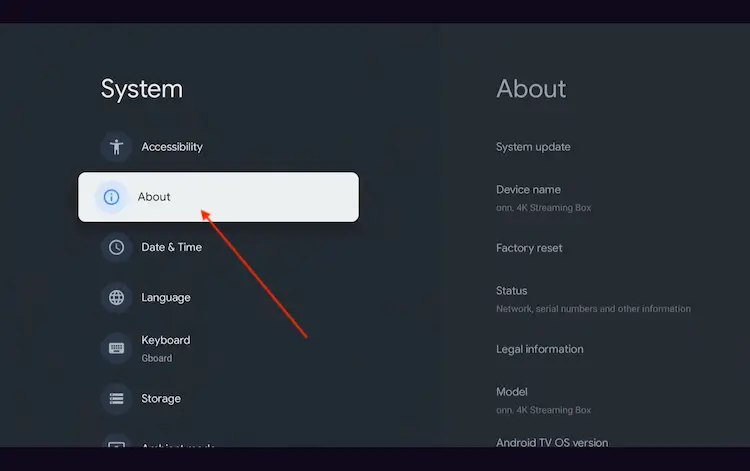
Navigate to System > About
Scroll to the bottom and click Android TV OS Build 7 times continuously until a pop-up says "You are now a developer."
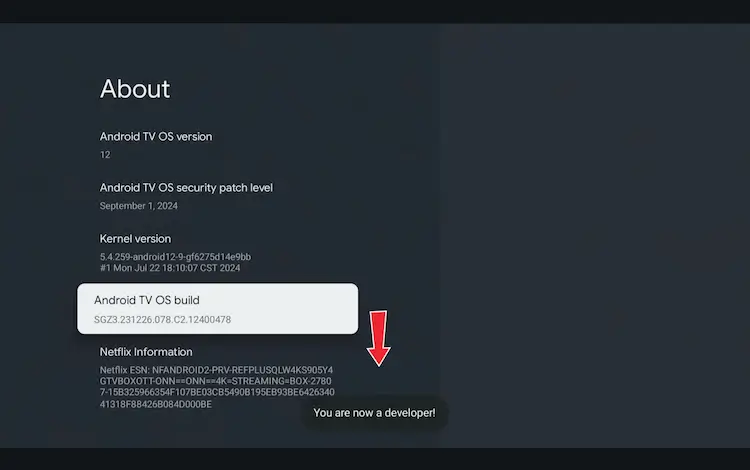
Click Android TV OS Build 7 times to unlock Developer Mode
Press the Home button on your remote, go to the top menu, and select Apps.
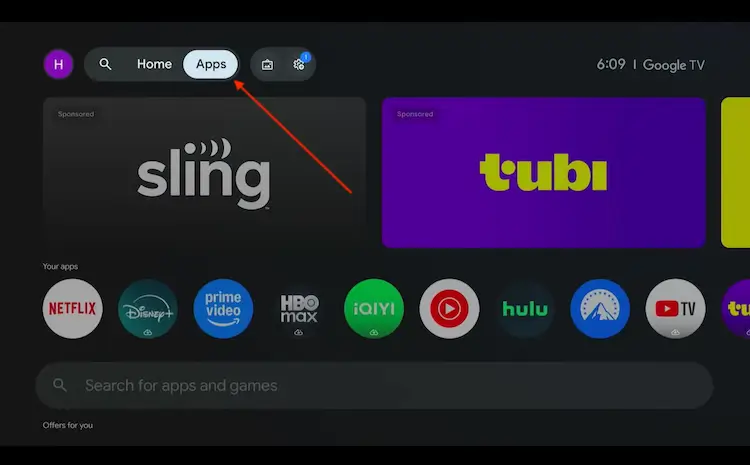
Back to the Onn TV home screen > Apps
Use the search bar and type Downloader and select the one at the top of the list
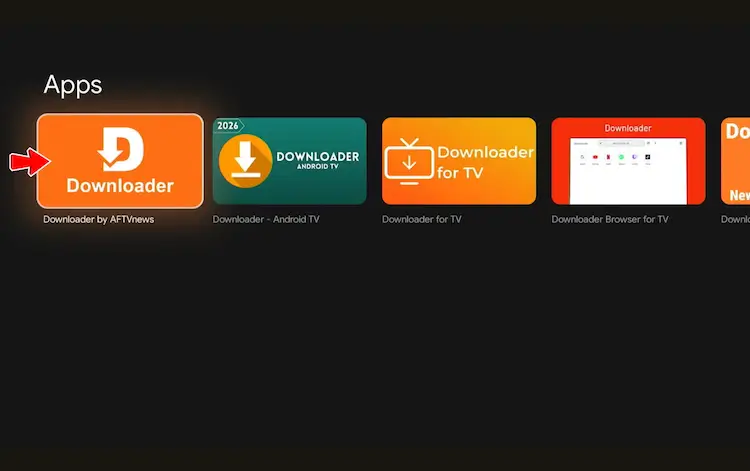
Select the Downloader app at the top of the search results
Click Install
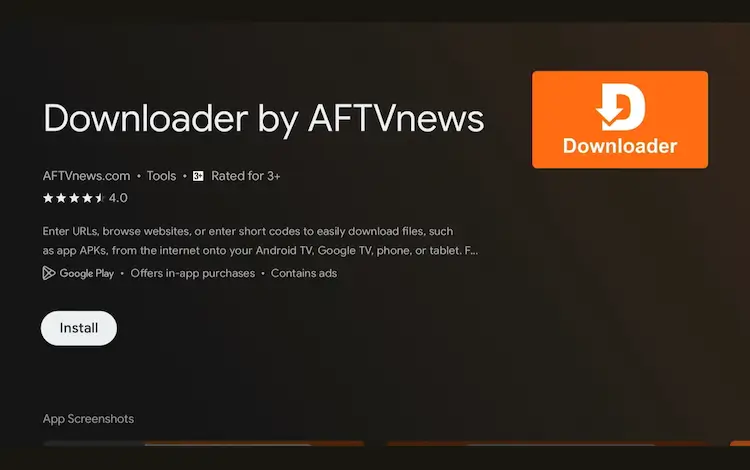
Press Install
Once installed, open the Downloader app and click on the URL/search bar.
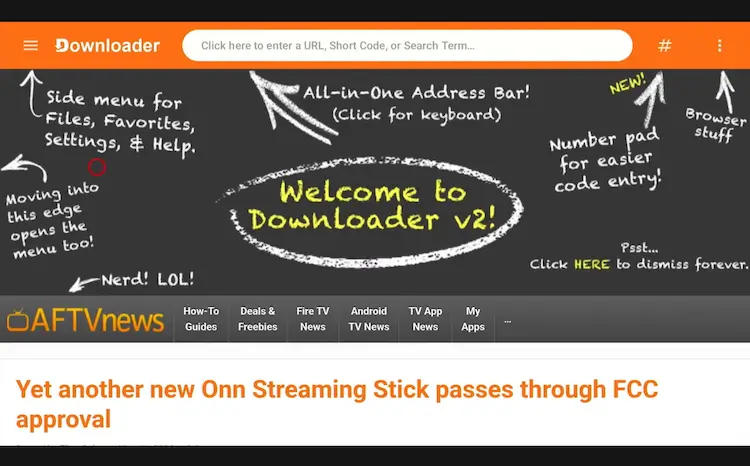
Open Downloader app > URL Search bar
Enter the exclusive Onn TV Hacks downloader code 8533602 below and press Go.
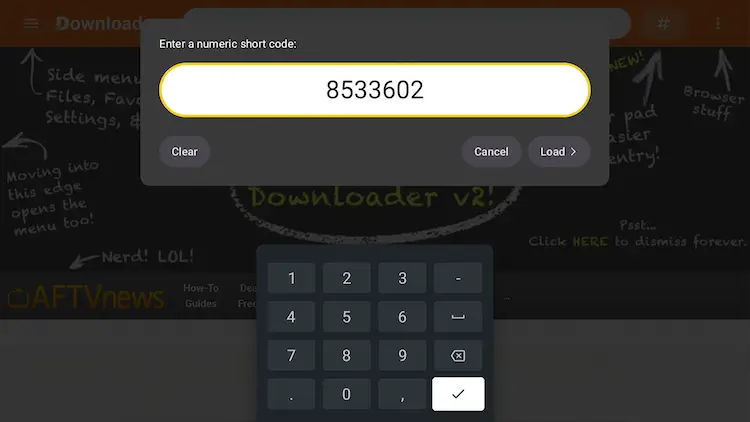
Add the popular 8533602 code
Scroll down inside the Downloader app and click on the ‘IPTV Media Player’ button.
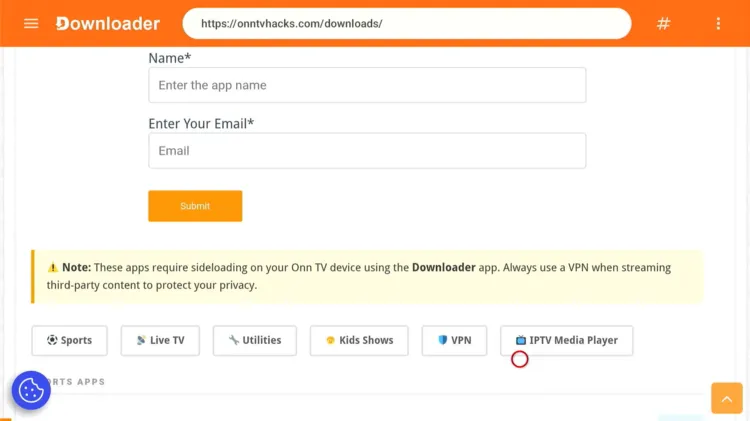
Click on the ‘IPTV Media Player’ button
Scroll below, spot Kodi, and click Download.
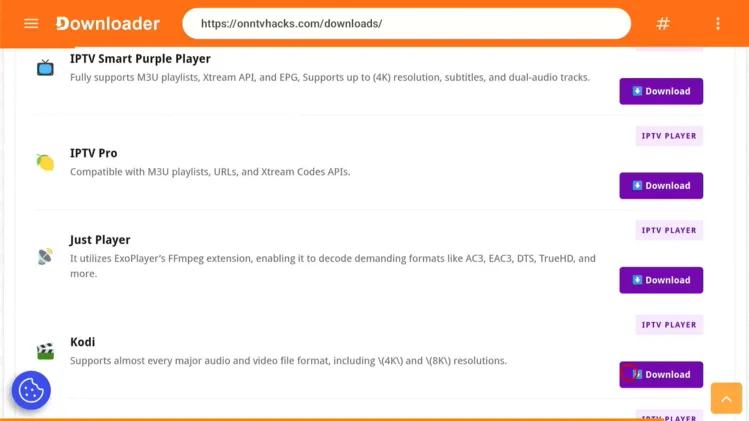
Click on ‘Download’
Your Kodi player will start downloading.
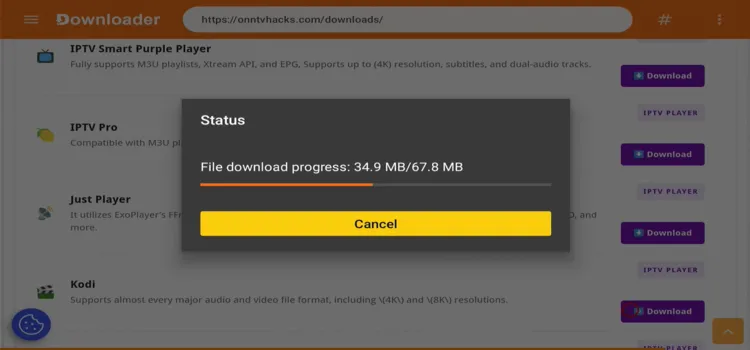
Your Kodi player will start downloading
A status window will open — click on Install.
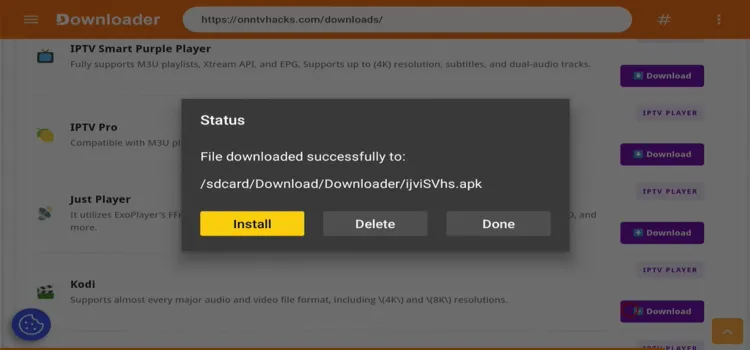
A ‘Status’ window will open, click on ‘Install’
A small confirmation window opens — click Install again.
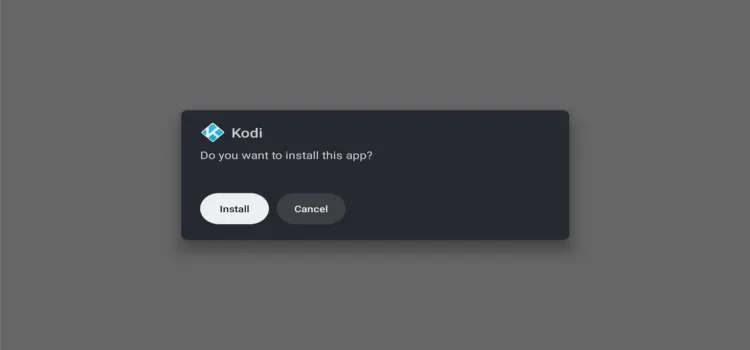
A small window will open, click on ‘Install’
Once installed, click Done.
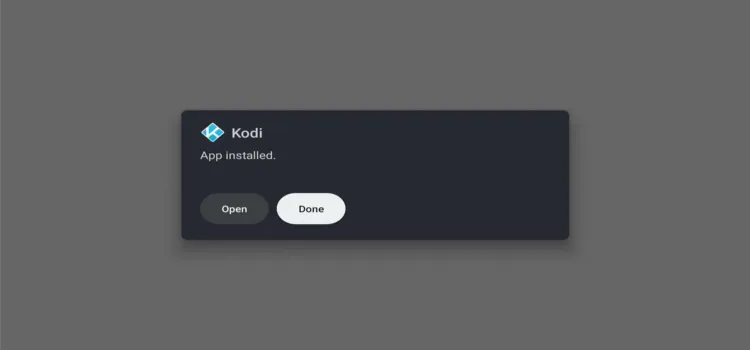
Click on ‘Done’
You’ll be redirected to the Status window — click Delete to remove the APK and free up space.
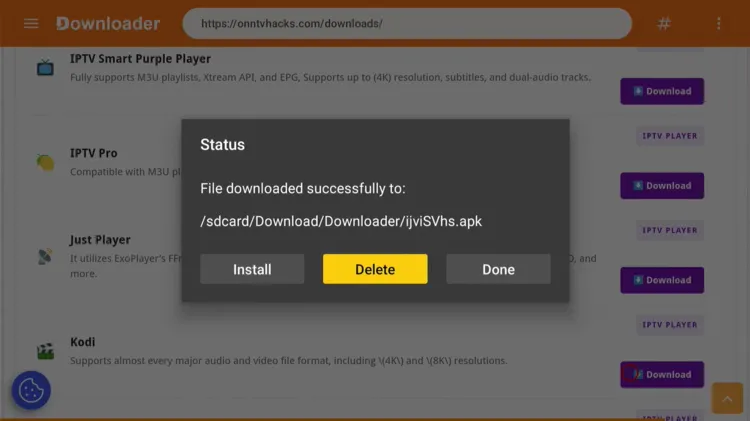
Click on ‘Delete’ (then confirm Delete again)
Press Home, scroll to Your Apps, and click on Kodi to launch it.
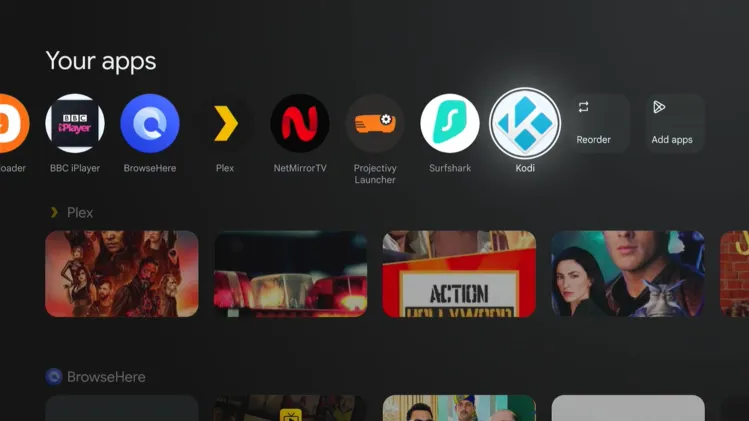
Click on Kodi player
Note: This method always gives you the latest official Kodi build. The ARM 64-bit version is the correct one for all current Onn TV Box models.
Get Surfshark — 87% Off Today →
How to Add Repositories to Kodi
Once Kodi is installed, you’ll want to add a repository to unlock add-ons. Here’s how to set up the DaButcher repository step by step:
After launching the app, a window will ask for access to device media and files. Click Continue.
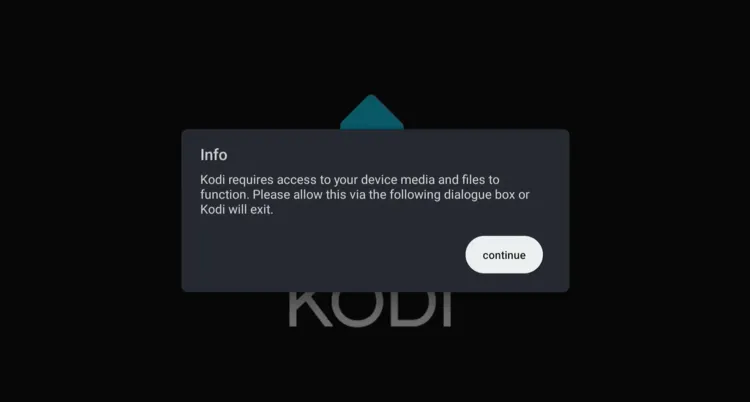
Click ‘Continue’
Click on Settings.
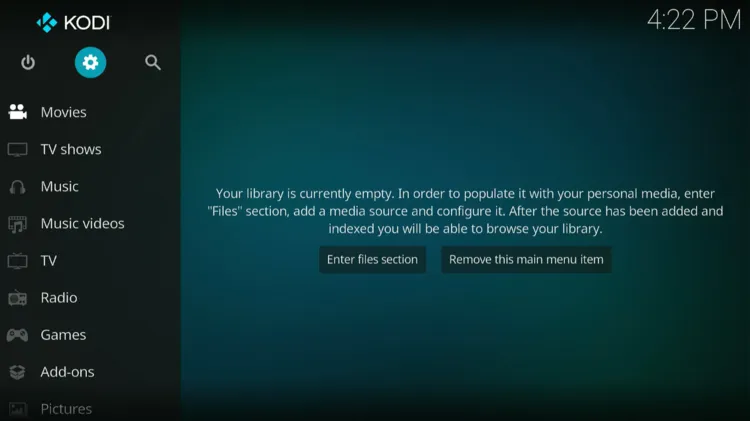
Click on ‘Settings’
Click on System.
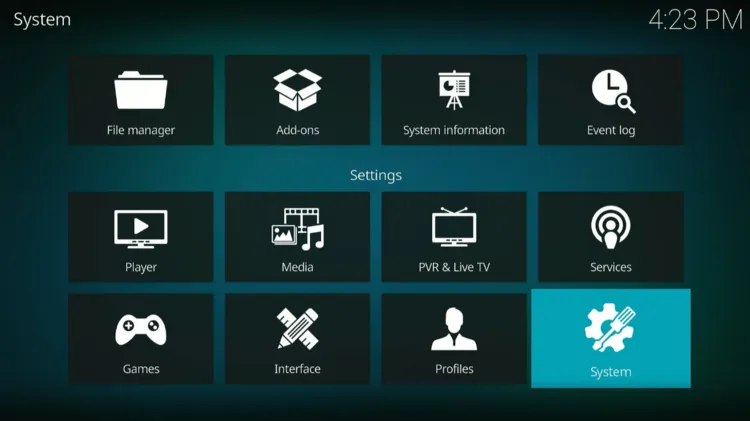
Click on ‘System’
Select Add-Ons and toggle ON for Unknown Sources.
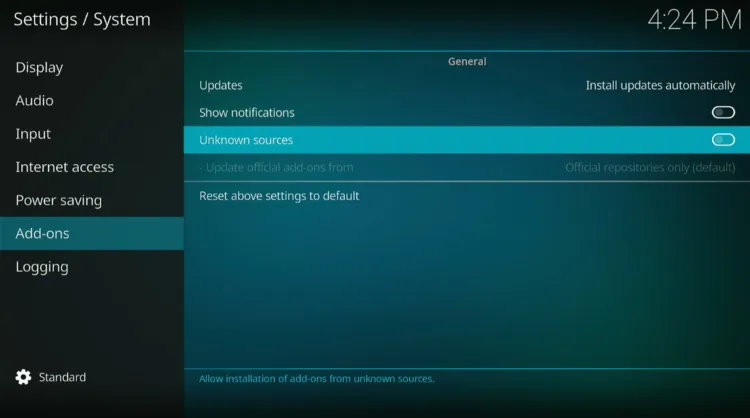
Select ‘Add-Ons’ and toggle ‘ON’
A warning window asks for access to data on your device. Click Yes.
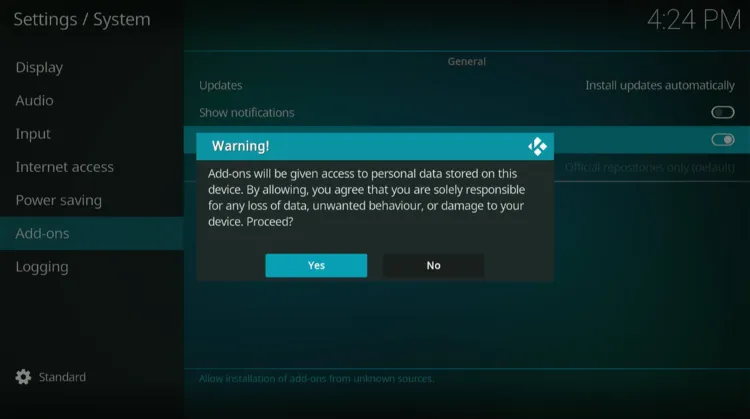
Click ‘Yes’ on the warning window
Go back to Settings → System → File Manager.
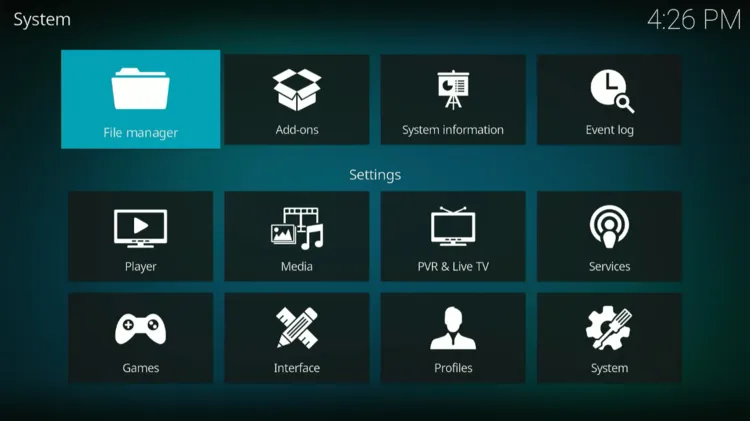
Go to ‘Settings/System/File Manager’
Click on Add Source.
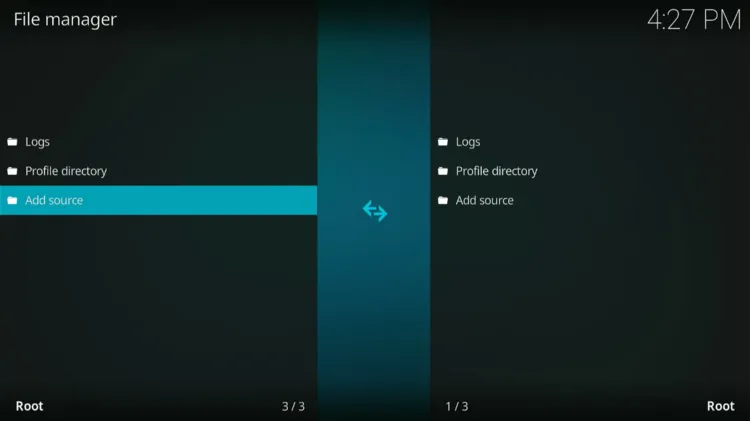
Click on ‘Add Source’
In the Add Source File window, click on <None>.
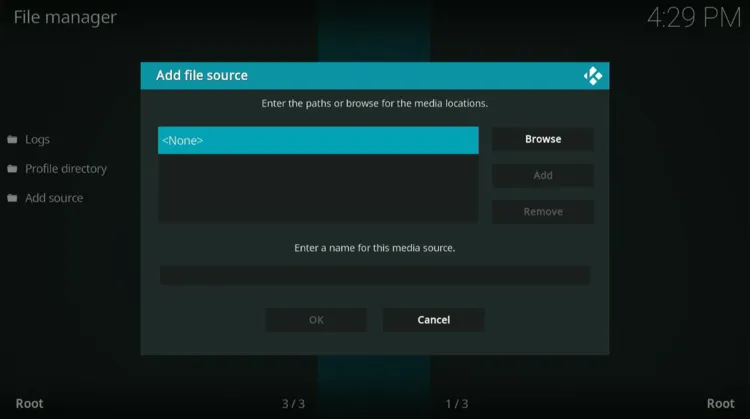
‘Add Source’ window will open. Click on ‘<None>’
In the path field, type the repository link: https://dabutcher.org/repo. Click OK.

Enter the repository link
A name field will auto-fill with “repo”. Click OK.
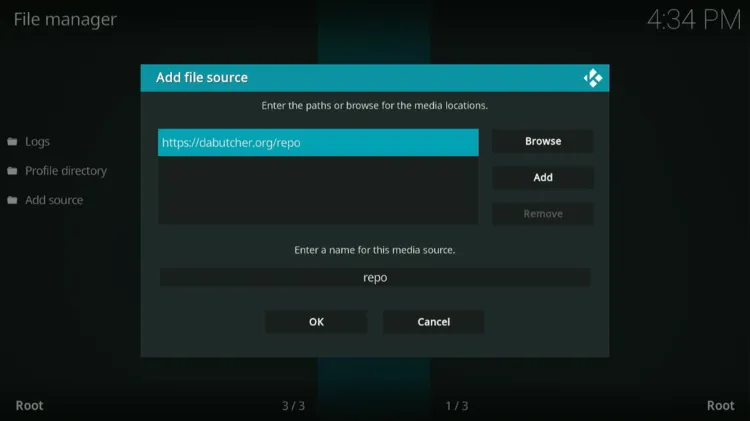
A repository name ‘repo’ will appear automatically
Go to Settings → System → Add-ons.
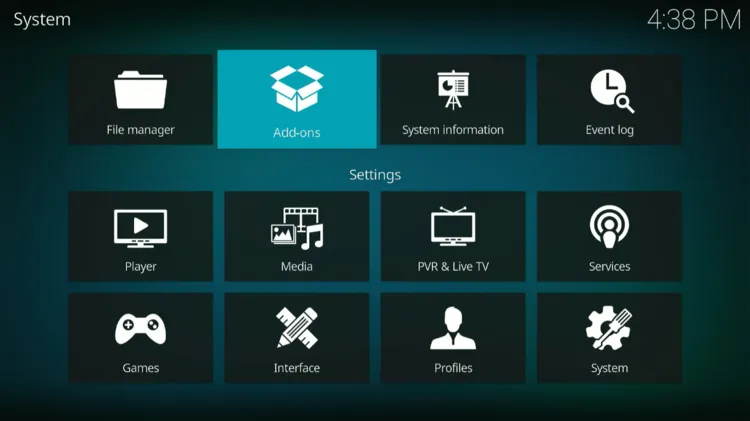
Go to ‘Settings/System/Add-ons’
Click on Install from zip file.
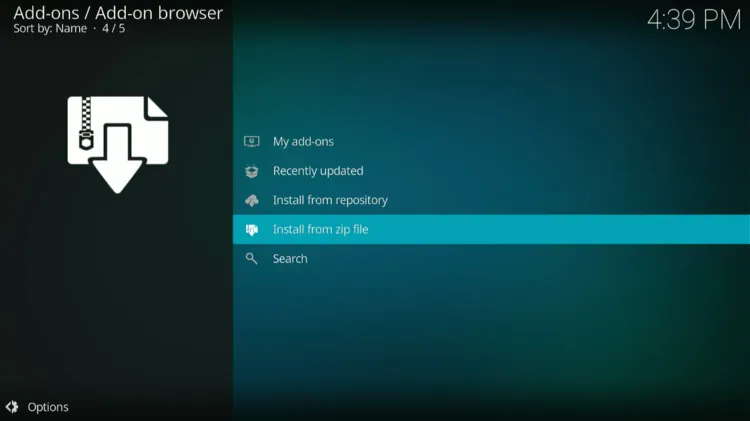
Click on ‘Install from zip file’
Scroll and select repo.
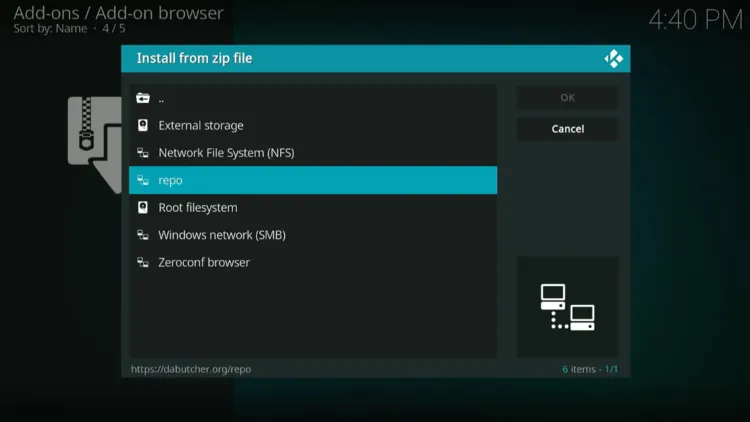
Scroll and select ‘repo’
Click on repository.dab-1.5.zip.

Click on ‘repository.dab-1.5.zip’
Back in the Add-on browser, click Install from repository — it will install automatically.
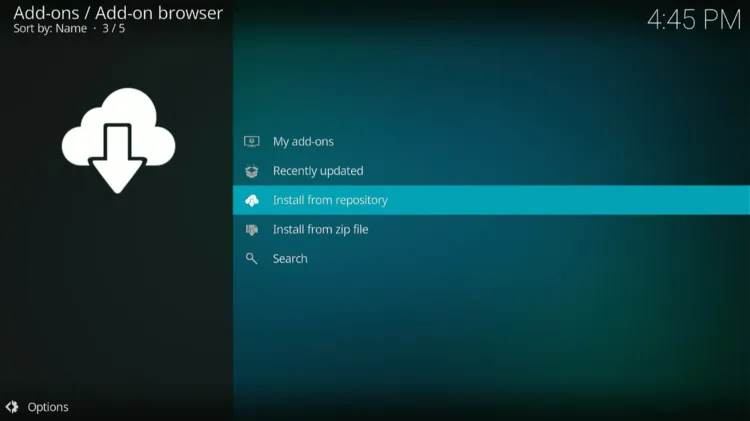
Click on ‘Install from repository’
Click on Dabutcher repository.
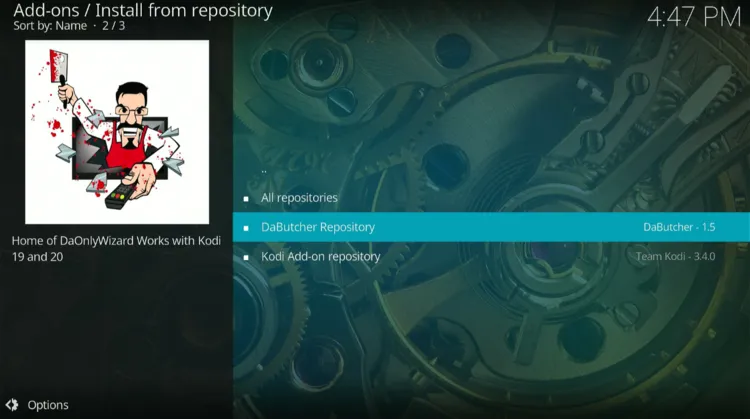
Click on ‘Dabutcher repository’
Click on Program add-ons.
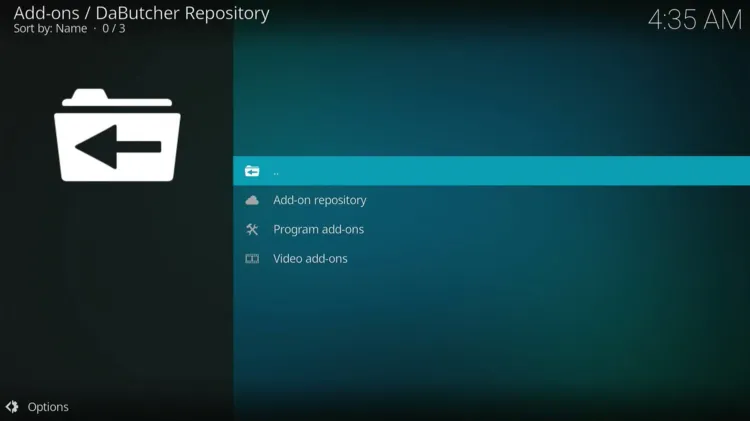
Click on ‘Program add-ons’
Click on ‘DaBs Kodi Wizard’, then click Install.

Click on ‘DaBs Kodi Wizard’, then ‘Install’
Select ‘Trakt & Debrid Data’ and click OK, then click Close on the popup that follows.
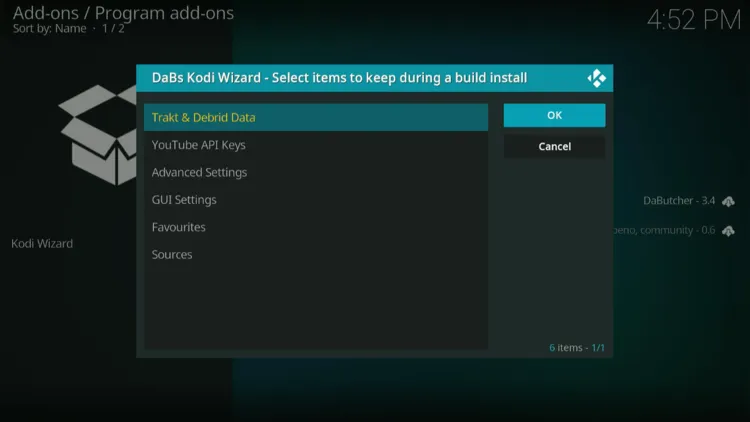
Select ‘Trakt & Debrid Data’, click ‘OK’, then ‘Close’
A pop-up asks to install the build — click Yes.
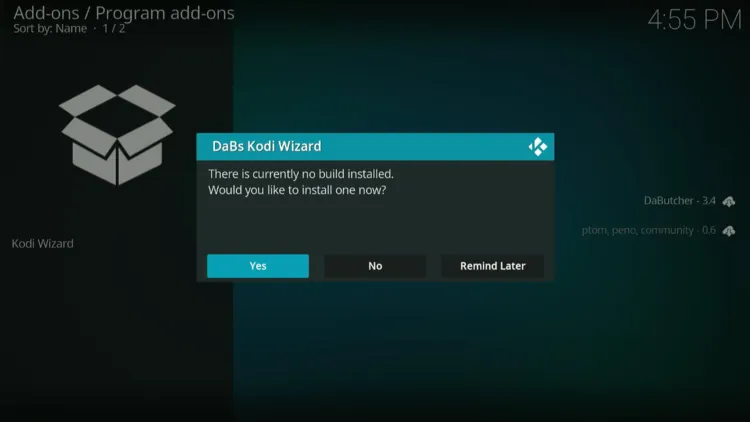
Click ‘Yes’
From the Build Menu, click on ‘Chameleon Build for Kodi 21 (v2.3)’, then click Continue on the confirmation popup.

Click on ‘Chameleon Build for Kodi 21 (v2.3)’, then ‘Continue’
The build will download and extract automatically. Once finished, click on ‘DaBs Kodi Wizard’ and click OK.

Build downloads, then click ‘DaBs Kodi Wizard’ and ‘OK’
Relaunch Kodi and browse the categories to start streaming.
Relaunch Kodi player and stream the content of your choice
Best Kodi Add-ons
These are the most popular Kodi add-ons that work reliably on the Onn TV Box in 2026. Always install add-ons from trusted repositories only.
| Add-on | Stream Type | Main Benefit | Source |
|---|---|---|---|
| PVR IPTV Simple Client | Custom M3U Playlists | Connects directly to your private IPTV provider via M3U URL or file | Official Kodi Repo |
| The Crew | Movies / TV / Live TV / Sports | All-in-one free add-on covering movies, sports, and live channels | The Crew Repo |
| Pluto TV | Ad-Supported Free TV | Hundreds of free live TV channels — no account or subscription required | SlyGuy Repo |
| Tubi | Ad-Supported Free TV | Legal and free with a large U.S.-based movie and TV library | SlyGuy Repo |
| YouTube | Video Streaming | Official add-on — requires a free Google API key for full playback | Official Kodi Repo |
| Plex | Hybrid Streaming / Local | Combines your personal library with free Plex channels — free tier available | Official Kodi Repo |
| Catch-up TV & More | Public Global Broadcasts | International live channels and catch-up TV sorted by country | Catch-up TV & More Repo |
| Umbrella | Debrid Streaming | Best premium add-on when paired with Real-Debrid or TorBox — near-instant HD/4K | The Crew Repo |
| Magic Dragon | Free Link Scraper | Popular free add-on for movies and TV — no debrid required | The Crew Repo |
| Exodus Redux | Free Link Scraper | Actively maintained add-on with solid free movie and TV links | Exodus Redux Repo |
⚠️ Warning: Avoid add-ons that stream pirated content. They violate Kodi’s terms and may expose you to legal risk.
Troubleshooting Kodi Installation Failures
If Kodi fails to install or crashes on your Onn TV Box, one of these fixes will usually resolve it.
| Issue | Fix |
|---|---|
| 💥 Kodi Crashes on Launch | Go to Settings → Apps → Kodi → Clear Cache. If it persists, uninstall and reinstall the ARM 64-bit APK from kodi.tv. |
| 🌐 Downloader Can’t Reach kodi.tv | Your internet may be blocked by your ISP or router. Try connecting to a VPN before opening Downloader. |
| 🔄 Add-ons Not Loading / Buffering | Run a speed test inside Kodi via Tools → Speed Test. For 1080p streaming, you need at least 15–25 Mbps consistently. |
Safety Tips for Using Kodi
- ✅ Only install add-ons from verified sources
- ✅ Use a VPN to encrypt your traffic and hide your activity from your ISP
- ✅ Never enter payment info into unofficial Kodi add-ons
- ✅ Keep Kodi updated to the latest version from kodi.tv
Is Kodi Legal & Safe to Install?
Yes — Kodi itself is 100% legal. Installing Kodi on your Onn TV Box does not break any laws. The legality depends entirely on what you stream through it.
Official add-ons like Pluto TV, Tubi, and YouTube are fully legal. Third-party add-ons that stream pirated content are not — proceed with caution and always use a VPN.
Get Surfshark — 87% Off Today →
❓ Frequently Asked Questions
Can I install Kodi on the Onn TV Box without a PC?
Yes. Use the Downloader app or the Google Play Store. Both methods work entirely on the Onn TV Box — no PC, USB drive, or ADB commands needed.
Which version of Kodi should I install on Onn TV Box?
Download the ARM 64-bit version from kodi.tv. This is compatible with all current Onn TV Box models, including the 4K and Full HD variants sold at Walmart.
Does Kodi slow down the Onn TV Box?
Kodi itself is lightweight. However, heavy add-ons or large local libraries can consume RAM. Clearing the cache regularly keeps performance stable on Onn’s 2GB RAM models.
Do I need a VPN to use Kodi on Onn TV Box?
A VPN is not required but highly recommended. It prevents ISP throttling, bypasses geo-blocks on certain add-ons, and protects your privacy while streaming through third-party sources.
Conclusion
Installing Kodi on your Onn TV Box takes less than 5 minutes using either the Downloader app or the Google Play Store. Both methods deliver the full Kodi experience at no cost.
The Downloader method gives you the latest official build and more control over which version you install. The Google Play Store method is simpler but may trail behind on updates.
For the best experience, use a reliable VPN. Surfshark VPN is our recommended choice It prevents ISP throttling, keeps your activity private, and unlocks geo-restricted content.
📌 Found this guide helpful? Drop a comment below and share it with your friends. Check out our Best Apps for Onn TV guide for more top picks to install alongside Kodi.
