 Onn TV Hacks Master Your Onn TV with Expert Guides, Hacks, & Apps
Proton VPN is a Swiss-based VPN that keeps your Onn TV streaming private and secure.
By hiding your IP address from your ISP, it protects your online activity and helps you bypass geo-blocks.
It’s one of the best-ranked VPNs for Onn TV, offering high-grade AES-256 encryption and a strict no-logs policy.
It’s a freemium VPN — the free plan offers unlimited data on basic servers with no speed caps. Upgrading gets you high-speed 10 Gbps servers, global access to 140+ countries, multi-device support, and more.
📋 Table of Contents
Featured VPN for Onn TV
Proton VPN
Swiss-based privacy, AES-256 encryption, and a genuinely free plan with no card details required.
Proton VPN Quick Overview
Before getting into the installation, here’s the short version of what you’re getting with Proton VPN:
| Detail | Info |
|---|---|
| 📱 Platform | Google TV / Android TV (Android 6.0+) |
| 📺 Onn Models Supported | Onn 4K, Onn 4K Plus, Onn 4K Pro, Onn 4K Stick |
| 📥 Install Method | Downloader app or Google Play Store |
| 💰 Price | Starts from $2.99/month |
| 🆓 Free Version | Available (servers in 5 countries only) |
| ↩️ Money-Back Guarantee | 30 days |
| 🌍 Servers | 20,000+ servers in 140+ countries |
| 🔐 Protocols | WireGuard, IKEv2, OpenVPN (UDP/TCP) |
| 📶 Devices | 1 device free, up to 10 devices on paid plans |
Method 1: Install Proton VPN From the Google Play Store
You can install the Proton VPN app directly from the Google Play Store. Here’s how:
|
1 |
Go to the Onn TV home screen and select Apps from the top menu bar. |
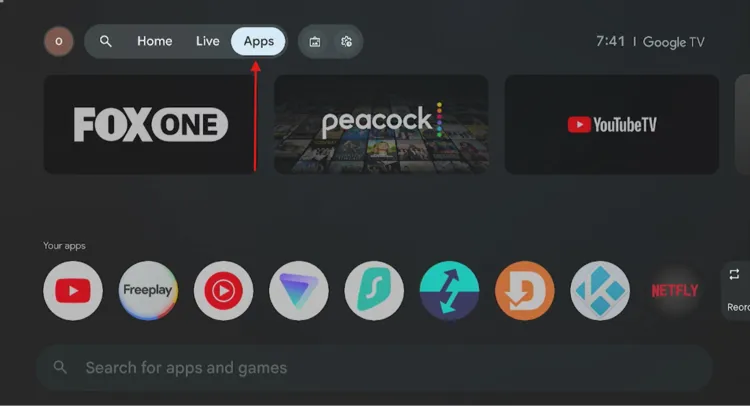
Home screen > Apps
|
2 |
Scroll down and tap the Search bar. |
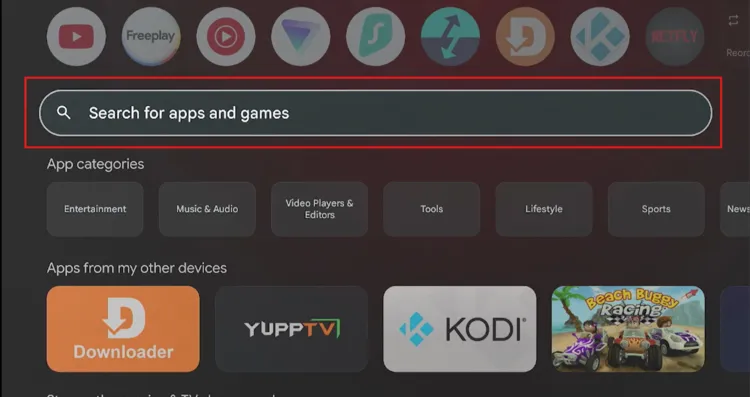
Tap the search bar
|
3 |
Type “Proton VPN” and tap the search icon. |
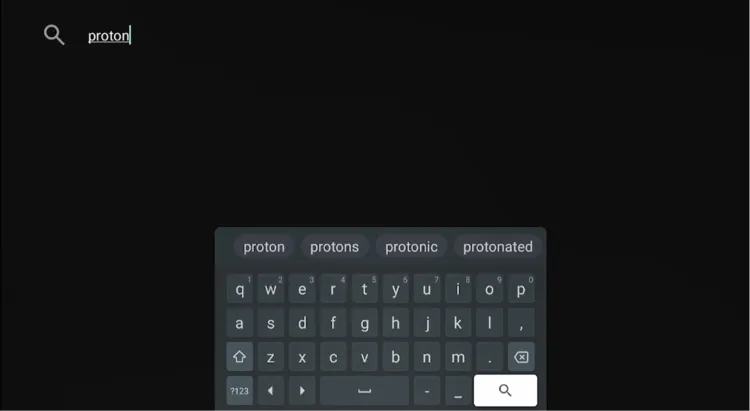
Search “Proton VPN”
|
4 |
Select Proton VPN from the search results. |

Select “Proton VPN”
|
5 |
Tap Install. |
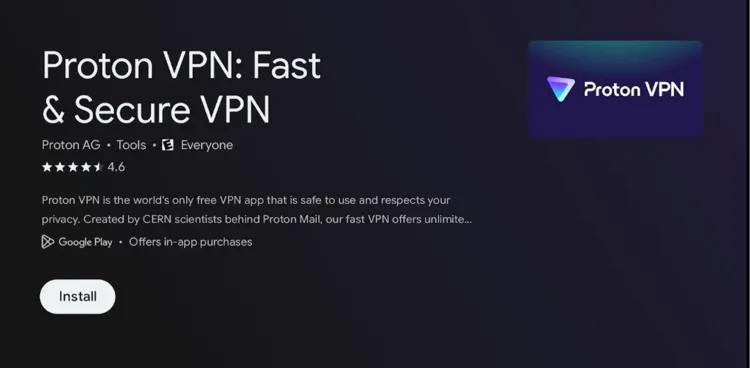
Tap “Install”
|
6 |
Once finished, tap Open to launch Proton VPN. |
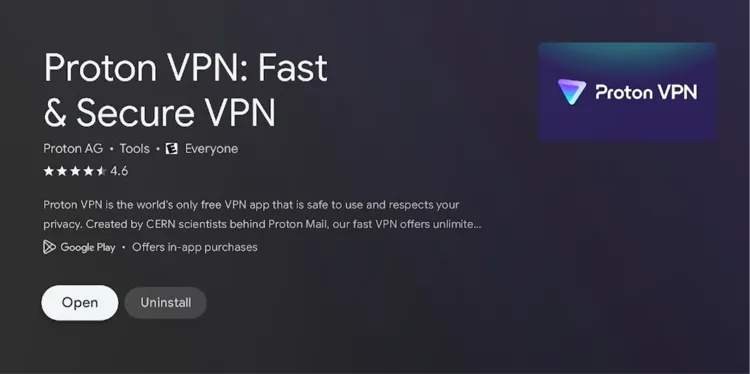
Tap “Open”
|
7 |
The app is now installed and ready to use on your Onn TV. |
Method 2: Install Proton VPN on Onn TV Using the Downloader App
In case Method 1 doesn’t work, or the Proton VPN app isn’t showing up in your region’s Play Store, you can sideload it on your Onn TV Stick or Box using the Downloader app.
Note: If you haven’t jailbroken your Onn TV yet or don’t have the Downloader app installed, follow the steps below first — otherwise, skip to step 10.
Go to Onn TV Home and then click on the Settings icon
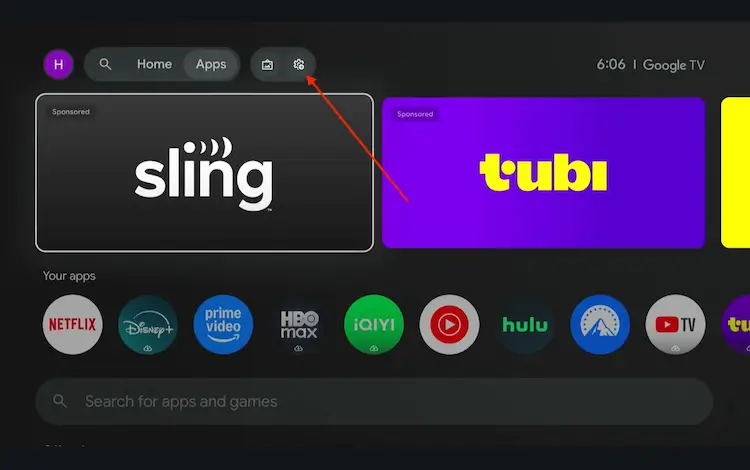
Settings icon on the Onn TV home screen
Select All Settings
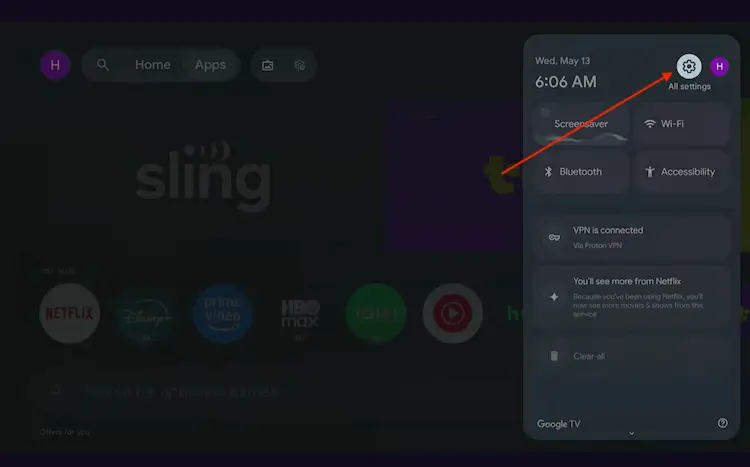
All Settings icon
Scroll down and select System, then choose About from the list.
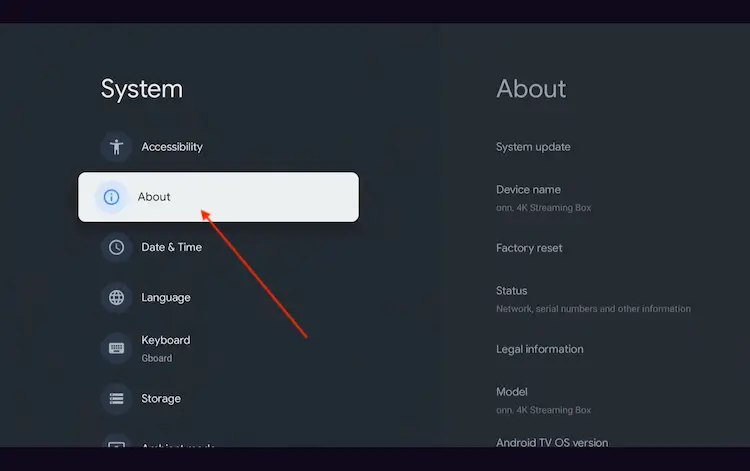
Navigate to System > About
Scroll to the bottom and click Android TV OS Build 7 times continuously until a pop-up says "You are now a developer."
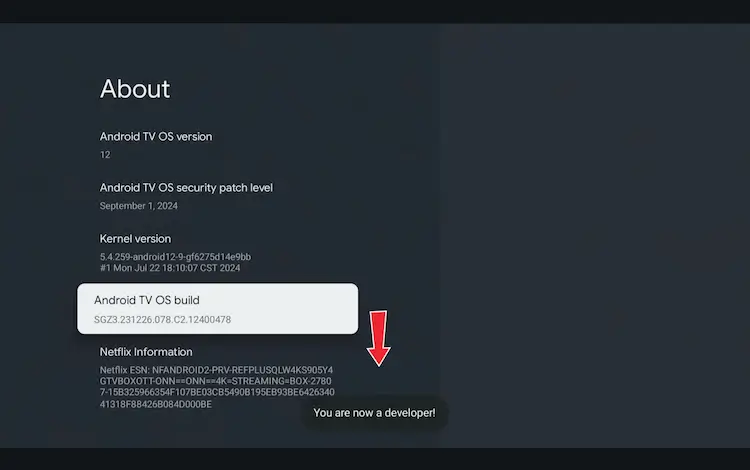
Click Android TV OS Build 7 times to unlock Developer Mode
Press the Home button on your remote, go to the top menu, and select Apps.
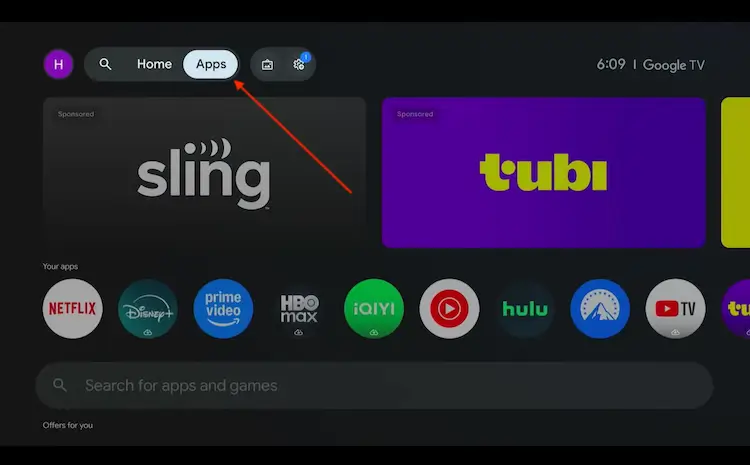
Back to the Onn TV home screen > Apps
Use the search bar and type Downloader and select the one at the top of the list
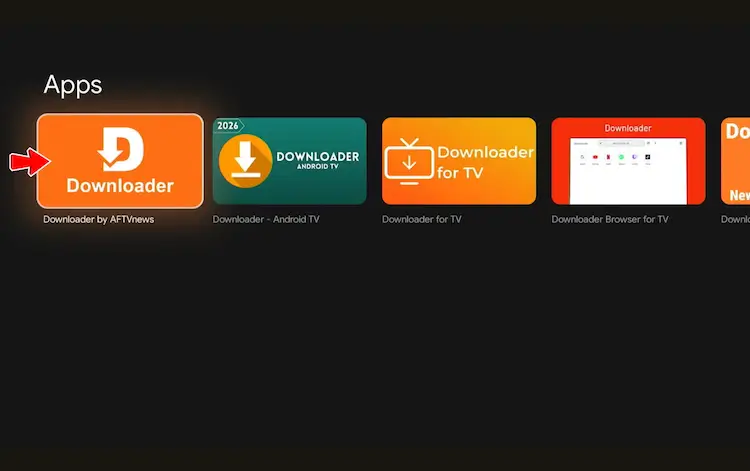
Select the Downloader app at the top of the search results
Click Install
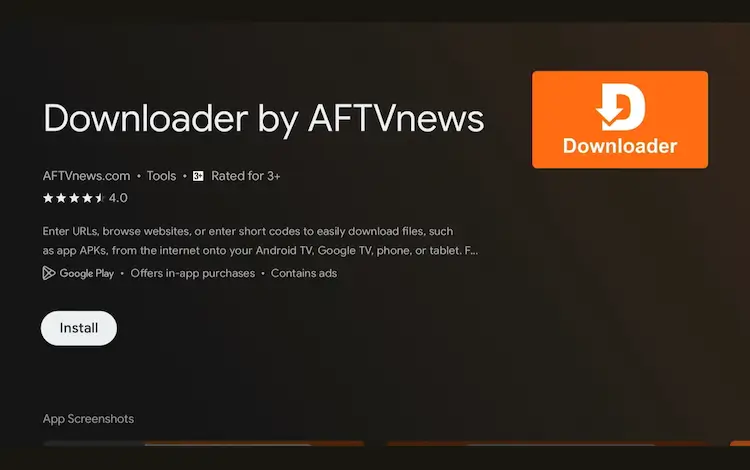
Press Install
Once installed, open the Downloader app and click on the URL/search bar.
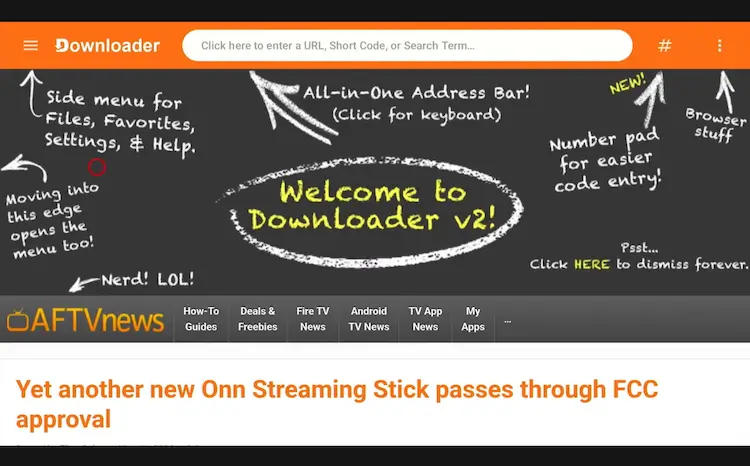
Open Downloader app > URL Search bar
Enter the exclusive Onn TV Hacks downloader code 8533602 below and press Go.
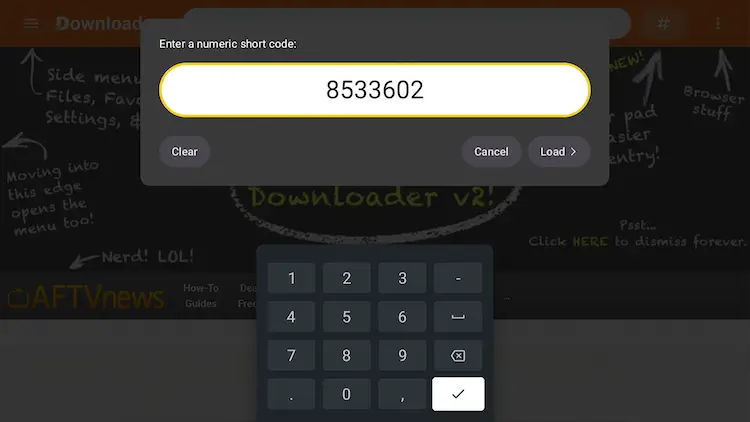
Add the popular 8533602 code
|
10 |
Scroll down on the Downloads page and select “VPN.” |
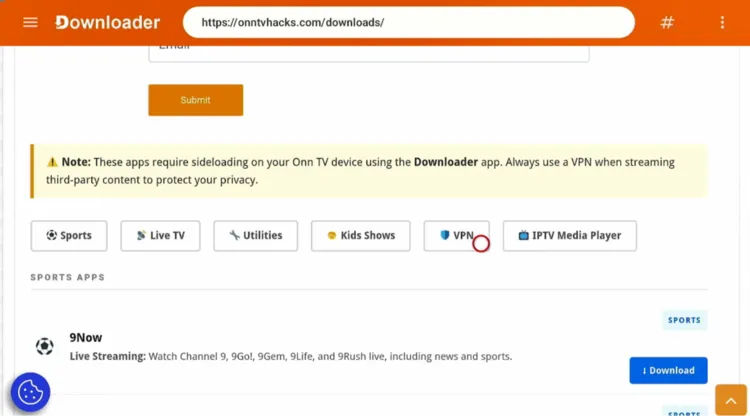
Select the “VPN” category
|
11 |
Find ProtonVPN and tap Download. |

Find “ProtonVPN,” tap “Download”
|
12 |
Wait for Proton VPN to finish downloading. |

Proton VPN is downloading
|
13 |
A status window will open — tap Install. |

Tap “Install”
|
14 |
Tap Done. |

Tap “Done”
|
15 |
Tap Delete to remove the APK and free up storage space. |
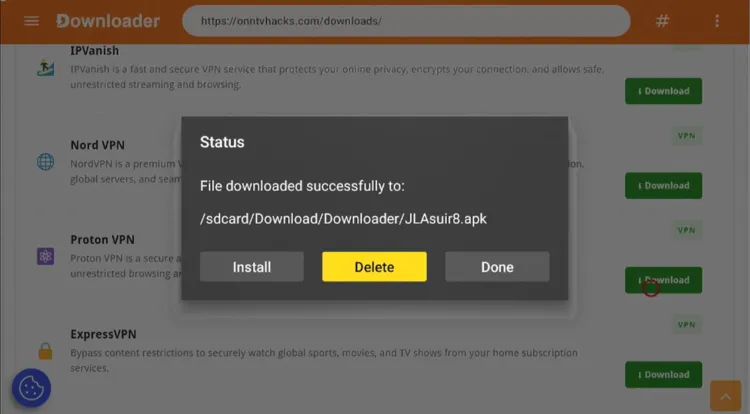
Tap “Delete”
|
16 |
Tap Delete again to confirm. |
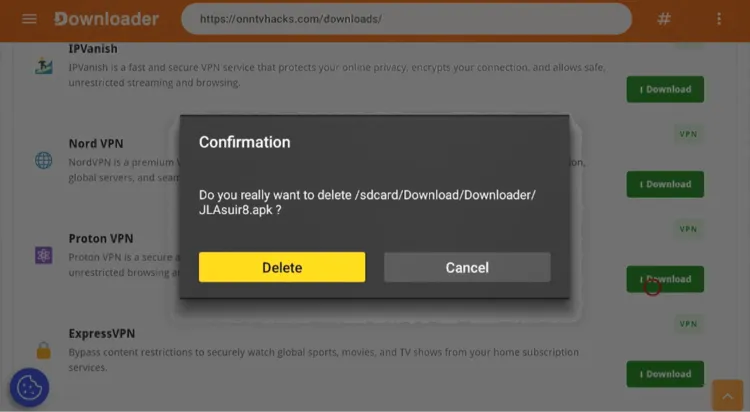
Confirm by tapping “Delete” again
How to Connect Proton VPN for Free on Your Onn TV
After installing the Proton VPN app, you can connect for free.
Proton VPN’s free plan gives you medium-speed connections and access to servers in 5 countries (randomly selected), no card details required.
Here’s how you do it:
|
1 |
Go to your Onn TV home page and open the Proton VPN app. |

Home > Proton VPN
|
2 |
Tap “Trouble Signing in?” |

Tap “Trouble Signing in?”
|
3 |
Note down the activation code shown on screen. |

Write down the activation code
|
4 |
Open a browser on your phone or laptop, go to protonvpn.com/tv, and tap Create new account. |
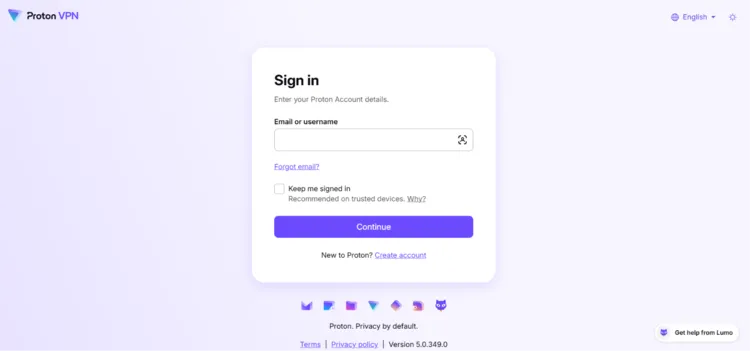
Tap “Create new account”
|
5 |
Tap “Sign up for free.” |
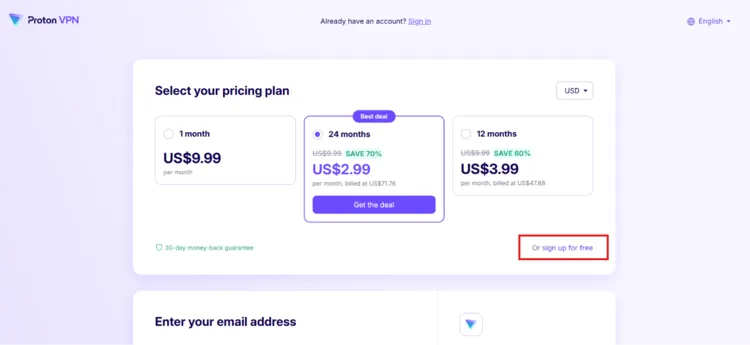
Tap “Sign up for free”
|
6 |
Enter your email address. |

Enter your email
|
7 |
Set up your password. |

Set up your password
|
8 |
Enter the TV activation code from step 3. |
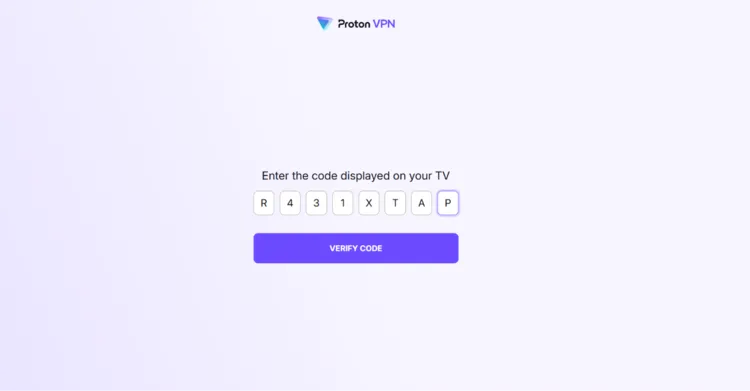
Enter the TV activation code
|
9 |
Once your account is linked, tap Quick Connect in the app to connect to a VPN server. |

Tap “Quick Connect”
How to Check if Proton VPN Is Working
Once Proton VPN is connected, it’s worth confirming your IP has actually changed. You’ll need a browser installed on your Onn TV for this.
Open the browser and type www.myipaddress.com in the search box. Your new IP address and server location should match the location you selected inside the app.
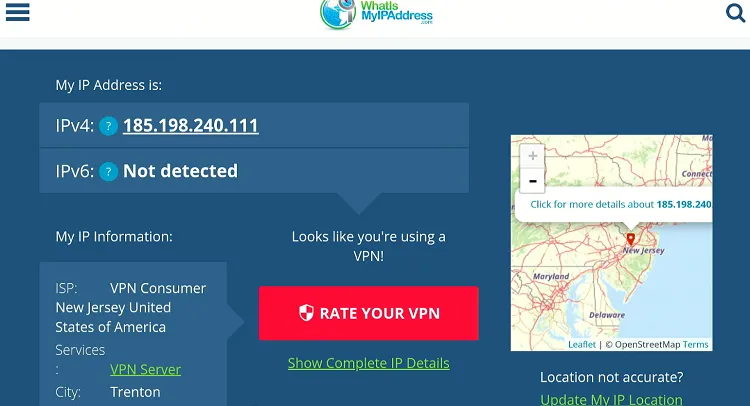
Your new IP address and location will show up here
Proton VPN Pricing (USD)
Here’s the breakdown of Proton VPN’s plans:
| Plan | Price |
|---|---|
| Proton Free | $0 — 1 device, servers in 5 countries (randomly selected), medium speed |
| Monthly Plan | Starts $9.99/month |
| 1-Year Plan | Starts $3.99/month, billed annually |
| 2-Year Plan | Starts $2.99/month, billed once every 2 years |
Best Value
Proton VPN — 2-Year Plan
Lock in the lowest per-month rate and cover up to 10 devices with one subscription.
Proton VPN Features
Here’s what stands out for Onn TV users:
Free Plan Available
No card details required
No-Logs Policy
Independently audited
AES-256 Encryption
Bank-grade security
Kill Switch
Blocks traffic if VPN drops
Secure Core
Double-hop VPN routing
NetShield
Built-in ad & malware blocker
VPN Accelerator
Faster streaming speeds
Up to 10 Devices
On every paid plan
Proton VPN Alternatives
If you’d rather compare a few options before settling on one for your Onn TV, these are worth a look:
- Surfshark— unlimited devices, built-in ad blocker
- NordVPN — large server network, Threat Protection
- ExpressVPN — fast speeds, simple interface
- IPVanish — unlimited connections, good for IPTV
Related Onn TV Guides
- Best VPNs for Onn TV — see how Proton VPN stacks up against the competition.
- Best Apps for Onn TV Box & Stick — more top picks to install alongside Proton VPN.
- Onn TV Downloads Page — sideload other working apps with a single code.
Frequently Asked Questions
Is Proton VPN free to use on Onn TV?
Yes. Proton VPN offers a genuinely free plan with access to servers in 5 countries and medium-speed connections — no trial period or card details needed.
Can I install Proton VPN on any Onn TV Box model?
Yes. Proton VPN works on all current Onn TV Box models, including the Onn 4K, 4K Plus, and 4K Pro. The installation process is identical across models as long as you can sideload apps via Downloader.
How many devices can I use with Proton VPN on Onn TV?
The free plan supports only one device at a time. Paid plans support up to 10 devices simultaneously.
Does Proton VPN have a kill switch on Onn TV?
Yes, Proton VPN’s kill switch works on Onn TV, but it’s only accessible to paid subscribers.
Why does Proton VPN buffer on my Onn TV?
Buffering is usually caused by a slow internet connection or a crowded free server. Make sure you have at least 15 Mbps for streaming, and try switching to a different server location or upgrading for VPN Accelerator support.
Conclusion
Installing Proton VPN on your Onn TV Stick or Box takes under 5 minutes using the Downloader app.
Its free plan makes it accessible to anyone, while the paid plans add speed, more server locations, and support for up to 10 devices at once.
Whether you’re browsing, streaming, or running sideloaded apps on Onn TV, keeping Proton VPN active is an easy way to keep your connection private.
Ready to Get Started?
Proton VPN
Try it free, no card required — or unlock full speed and 10-device support with a paid plan.
📌 Found this guide useful? Share it with a fellow streamer and drop a comment below. Check out our Best VPNs for Onn TV guide for more options.
