 Onn TV Hacks Master Your Onn TV with Expert Guides, Hacks, & Apps

Written and tested by Black Joseph
Updated November 4, 2026
When you buy through our links, we may earn a commission. See how we work with brands here.
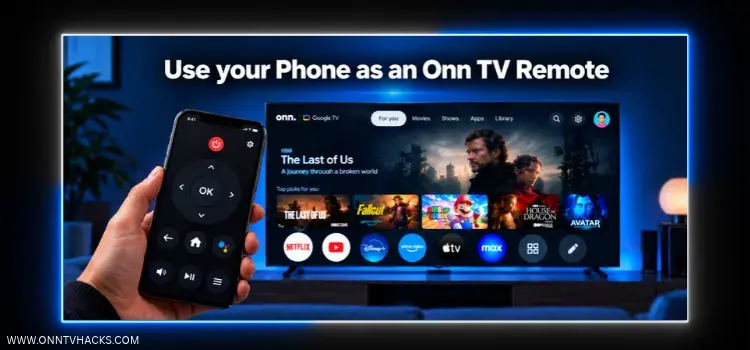
Lost the remote, or the batteries finally gave up? Your Android phone can take over the job.
Joz Remote for Onn TV is a free, ad-free app that turns your phone into a full remote. You can pair it with your Onn TV, navigate, type, search by voice, and open apps, and there’s nothing to install on the TV itself.
We built this app ourselves, and in this guide we’ll show you how to install it, pair it with your Onn TV, and use it.
📋 Table of Contents
Joz Remote Quick Overview
Here’s a quick look at what Joz Remote offers and what you need to use it:
| Detail | Info |
|---|---|
| 📱 Works On | Android phones (iOS version under development) |
| 📺 Controls | Onn 4K streaming box/stick |
| 📥 Install From | Google Play Store |
| 💰 Price | Free |
| 🚫 Ads | None |
| 📦 App Size | 1.4 MB |
| 📶 Connection | Same Wi-Fi network on your phone and Onn TV |
| 🛠️ TV Setup | Nothing to install on the TV |
How to Install Joz Remote on Your Android Phone
Install the app on your Android phone directly from the Google Play Store:
|
1 |
Open the Google Play Store on your phone and search for “Joz Remote for Onn TV“ and select the app. |
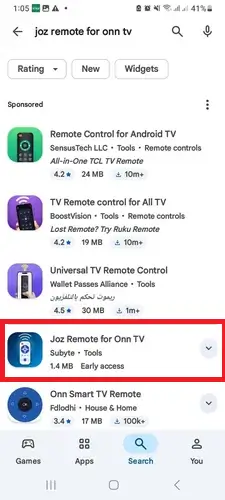
Search “Joz Remote for Onn TV”
|
2 |
Tap Install. |
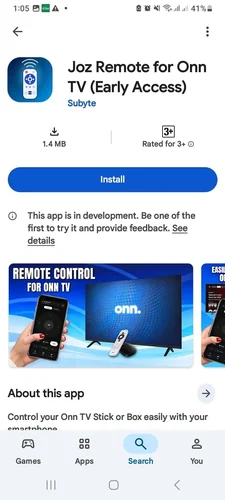
Tap “Install”
|
3 |
Once it’s installed, tap Open. |
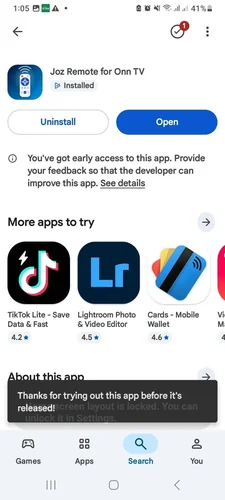
How to Pair Joz Remote With Your Onn TV
Pairing is a one-time setup. Make sure your Onn TV is turned on and your phone is on the same Wi-Fi network.
|
1 |
Open the app and read the intro screens. Tap Next to move through them. |
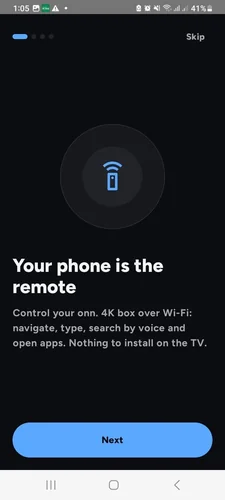
Tap “Next”
|
2 |
On the last screen, tap Find my TV. If the connection ever fails, this screen lists the quick checks. |
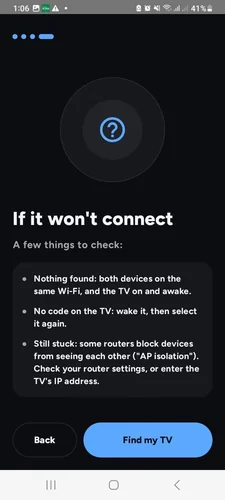
Tap “Find my TV”
|
3 |
Under TVs on this network, select your Onn TV. |
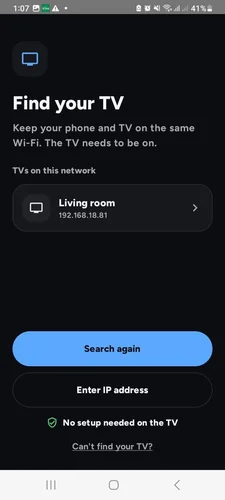
Select your TV from the list
|
4 |
A 6-character code will appear on your TV. Enter it in the app and tap Pair. You only need to do this once. |
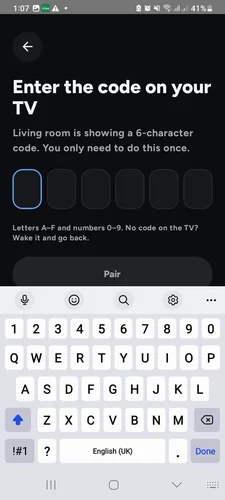
Enter the code and tap “Pair”
|
5 |
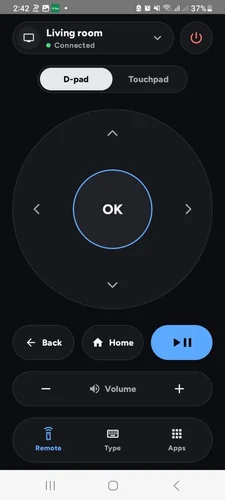
When you see Connected at the top, your phone is now your Onn TV remote. |
How to Use Your Phone as an Onn TV Remote
Joz Remote has three tabs at the bottom: Remote, Type, and Apps.
|
1 |
On the Remote tab, use the D-pad to move around and tap OK to select. You also get Back, Home, Play/Pause, and Volume buttons, plus a power button. |
D-pad, Back, Home, Play/Pause, and Volume
|
2 |
Prefer swiping? Switch to Touchpad. Swipe to move, tap to select, and hold after a swipe to keep moving. |
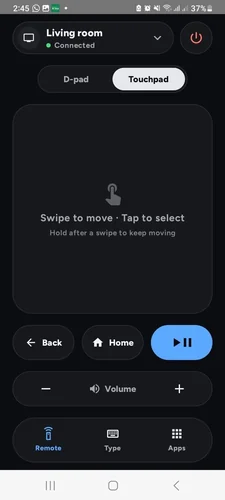
Touchpad mode
|
3 |
Open the Type tab to type on your phone keyboard instead of the on-screen one. Select a search or text box on the TV first, or tap the mic and speak. |
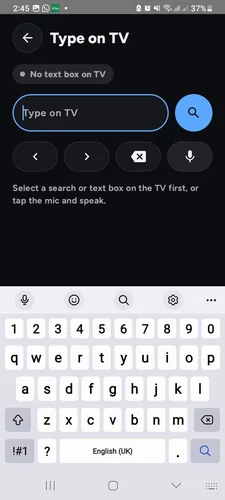
Type or speak to search
|
4 |
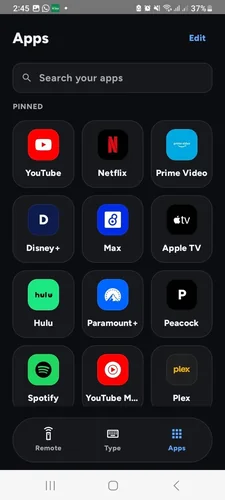
Open the Apps tab to launch your favorite apps. Pinned apps appear at the top, and you can search your apps or tap Edit to change them. |
Joz Remote Features
Joz Remote keeps things simple. Here’s what you get:
Free & Ad-Free
No payments, no ads
D-Pad Control
OK, Back, Home, Play/Pause
Touchpad Mode
Swipe to move, tap to select
Type on TV
Use your phone keyboard
Voice Search
Tap the mic and speak
Volume & Power
Buttons right on screen
Apps Launcher
Pinned apps and search
Lightweight
Only 1.4 MB
Phone Not Connecting to Your Onn TV? Try These Fixes
If Joz Remote can’t find your Onn TV, these are the quickest fixes:
| Problem | Fix |
|---|---|
| Nothing found | Make sure both devices are on the same Wi-Fi, and the TV is on and awake. |
| No code on the TV | Wake the TV, then select it again in the app. |
| Still stuck | Some routers block devices from seeing each other (“AP isolation”). Check your router settings, or enter the TV’s IP address. |
Other Remote Apps for Onn TV
Want to try something else? These are also worth a look:
- Google TV Remote app — the official remote built into Google’s own app
- Onn Smart TV Remote — a Play Store remote app made for Onn devices
- Remote Control for Android TV — a general remote for Android TV devices
Related Onn TV Guides
- How to Install Mouse Toggle on Onn TV — use your phone as a mouse for apps that ignore the D-pad.
- How to Set Up Your Onn TV Box — setting up a new Onn device from scratch.
- Hidden Onn TV Settings to Change — settings worth tweaking once your remote is sorted.
Frequently Asked Questions
How do I use my phone as an Onn TV remote?
Install Joz Remote for Onn TV from the Google Play Store, make sure your phone and Onn TV are on the same Wi-Fi network, then tap Find my TV and select your Onn TV. Enter the 6-character code shown on the TV and tap Pair.
What can I do with Joz Remote?
You can navigate with a D-pad or touchpad, use the Back, Home, Play/Pause, Volume, and power buttons, type with your phone keyboard, search by voice, and launch your favorite apps.
Is Joz Remote free?
Yes. Joz Remote for Onn TV is free and has no ads.
Do I need to install anything on my Onn TV?
No. Nothing needs to be installed on the TV. You just pair the app using the 6-character code shown on screen.
Do I need to pair the app every time?
No. You only need to enter the code once.
Does it work on iPhone?
Joz Remote is an Android app, so it needs an Android phone.
Why can’t the app find my Onn TV?
Check that both devices are on the same Wi-Fi and the TV is on. If it still isn’t found, enter the TV’s IP address manually or check your router for AP isolation.
Conclusion
With Joz Remote, a lost or broken remote is no longer a problem. Install it, pair it once with the code on your TV, and your phone does the rest.
📌 Found this guide useful? Share it with a fellow streamer and drop a comment below. Check out our Best Apps for Onn TV guide for more.