 Onn TV Hacks Master Your Onn TV with Expert Guides, Hacks, & Apps

Quick answer: Install Sportzfy on Onn TV by sideloading with the Downloader app. Enter code 8533602, select Sports, choose Sportzfy, and install the APK on your Onn TV.
Sportzfy is a free third-party Android sports app that provides sports sections, schedules, scores, highlights, channels, and stream links, depending on the installed build.
It lets you watch soccer, cricket, racing, motorsports, and more. If you want to see how it stacks up against other options, check out our best sports apps for Onn TV roundup.
The app doesn’t require sign-up, and it also supports M3U and Xtream Codes.
Since Sportzfy streams from unverified sources, it’s recommended to use a VPN before you start streaming. Surfshark VPN is our top choice
📋 Table of Contents
Our Top Pick for Onn TV
Surfshark VPN
One tap to protect your Onn TV. Unlimited devices. Built-in ad blocker. Under $2/month.
Get Surfshark — 87% Off Today →
Disclaimer: OnnTVHacks does not host, operate, or verify the licensing status of any third-party apps, websites, or streaming services mentioned on this site. We do not own or resell any media content.
How to Install Sportzfy
The following method uses Downloader because the app isn’t available on the Google Play Store. If you haven’t jailbroken your Onn Stick/Box yet, follow that guide first — otherwise, skip straight to step 10 below.
Before streaming anything on Sportzfy, make sure to install Surfshark VPN on your Onn device.
Go to Onn TV Home and then click on the Settings icon
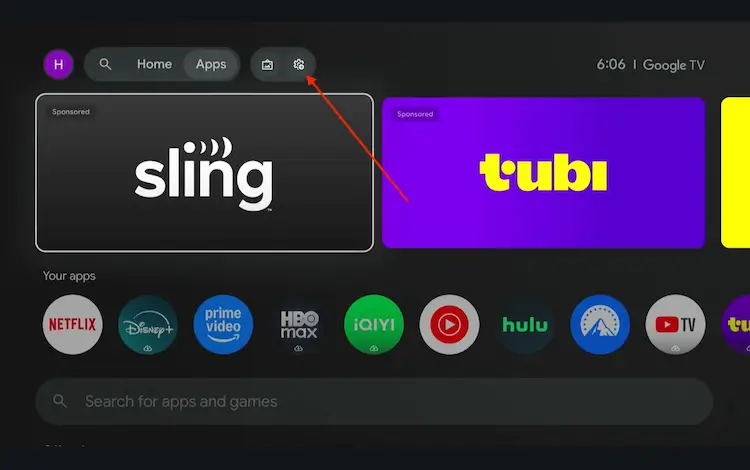
Settings icon on the Onn TV home screen
Select All Settings
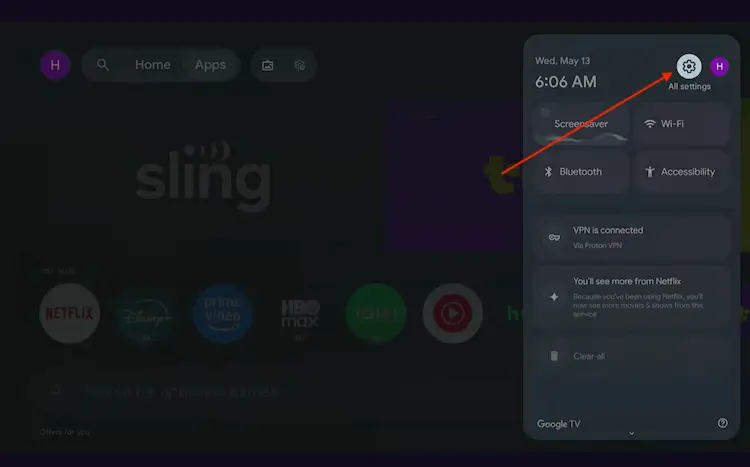
All Settings icon
Scroll down and select System, then choose About from the list.
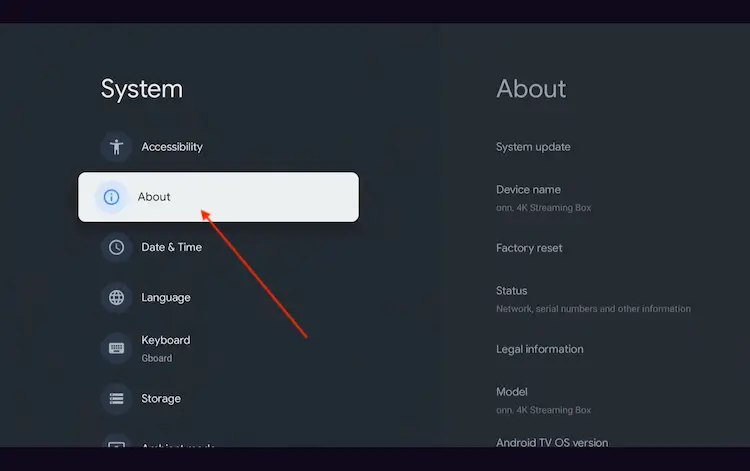
Navigate to System > About
Scroll to the bottom and click Android TV OS Build 7 times continuously until a pop-up says "You are now a developer."
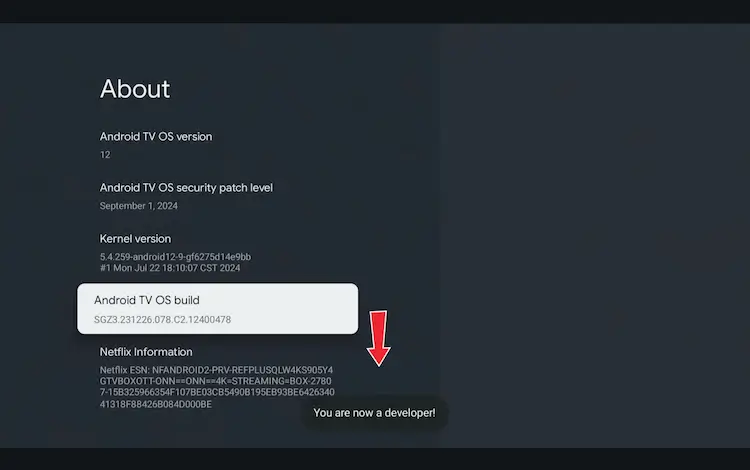
Click Android TV OS Build 7 times to unlock Developer Mode
Press the Home button on your remote, go to the top menu, and select Apps.
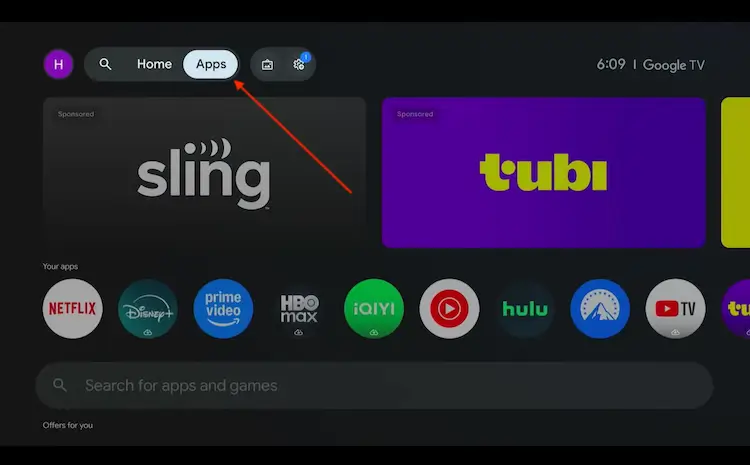
Back to the Onn TV home screen > Apps
Use the search bar and type Downloader and select the one at the top of the list
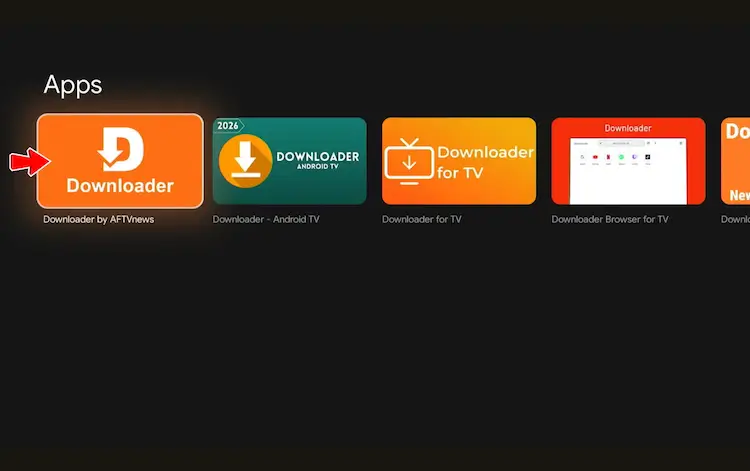
Select the Downloader app at the top of the search results
Click Install
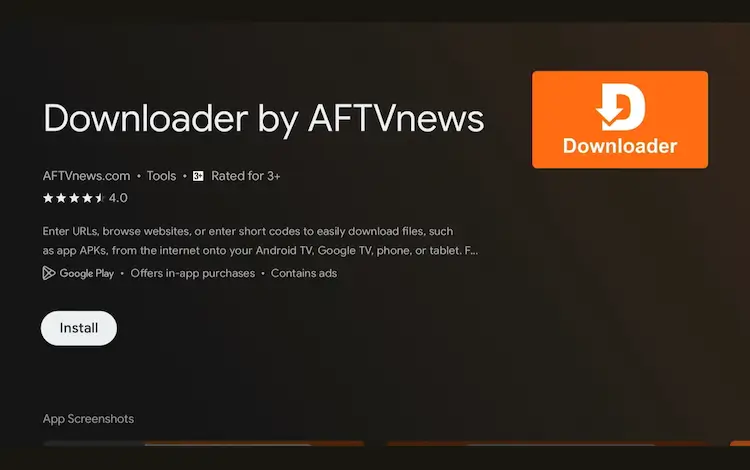
Press Install
Once installed, open the Downloader app and click on the URL/search bar.
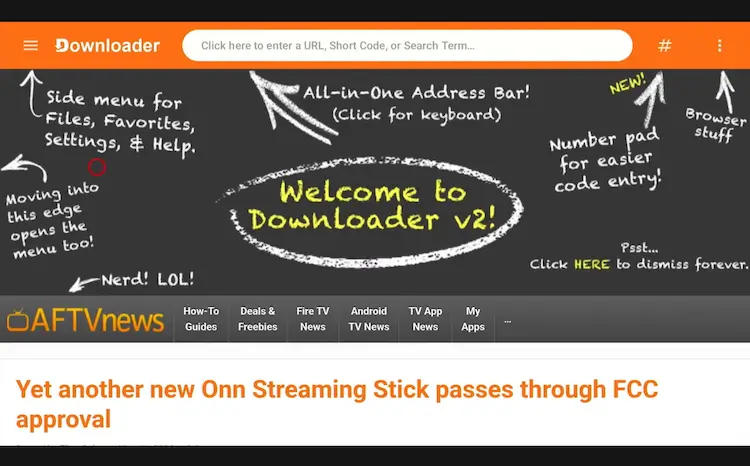
Open Downloader app > URL Search bar
Enter the exclusive Onn TV Hacks downloader code 8533602 below and press Go.
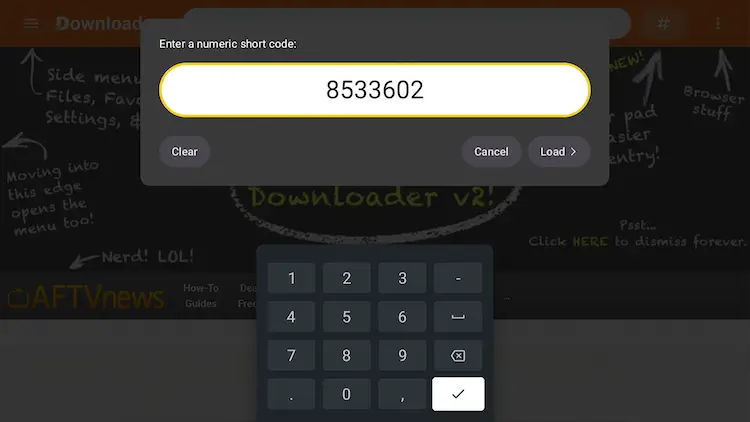
Add the popular 8533602 code
On the Onn TV Hacks download page, choose the Sports category.
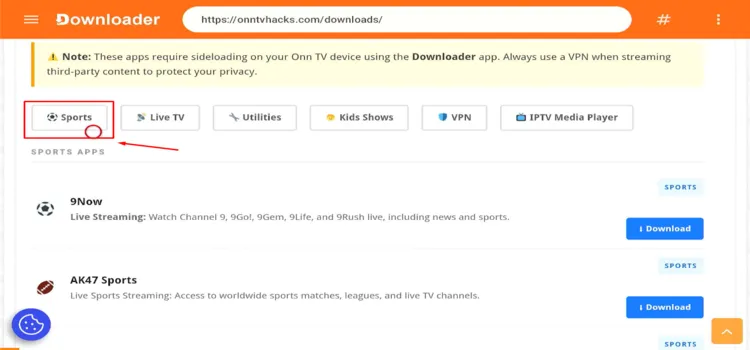
Open the Sports category
Scroll to Sportzfy and tap Download.
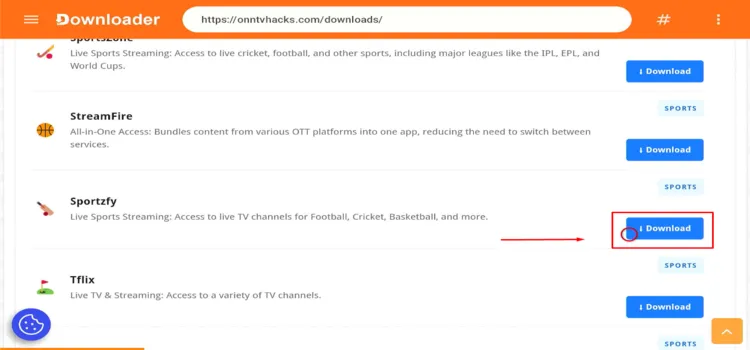
Select the Sportzfy download
A MediaFire page will open — tap Download.
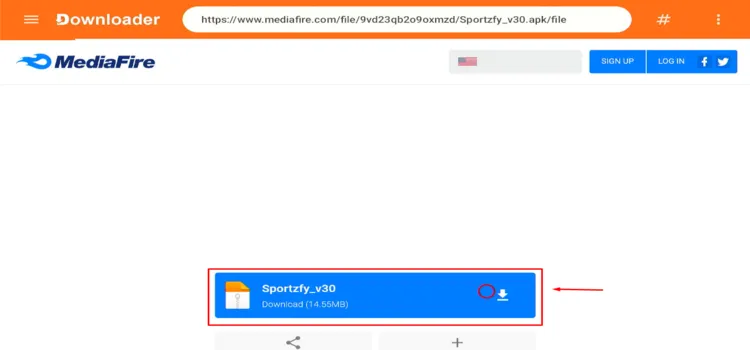
Tap “Download”
Sportzfy will start downloading.
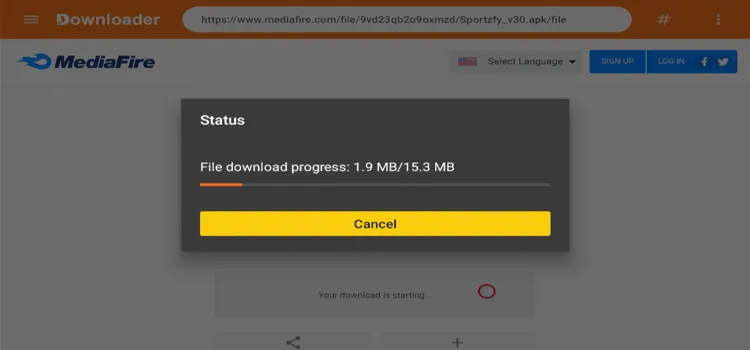
Sportzfy is downloading
Tap Install.
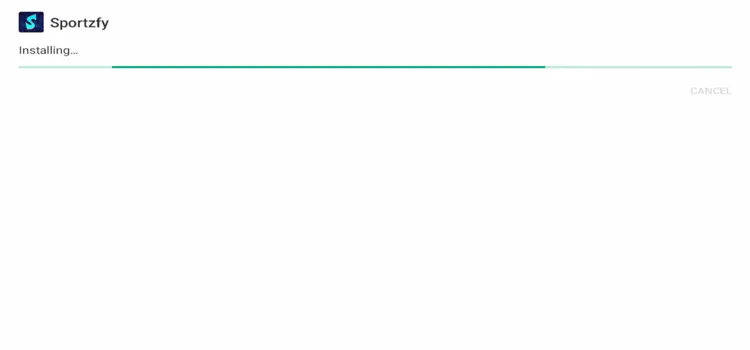
Tap “Install”
Tap Done.

Tap “Done”
A status window will open — tap Delete to remove the leftover APK file.
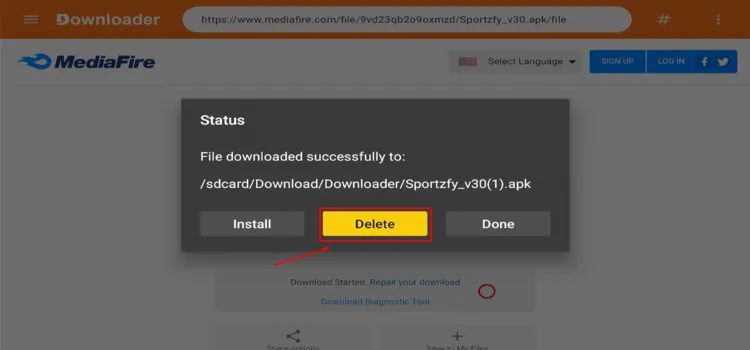
Delete the downloaded APK
A confirmation window will open. Tap Delete again.
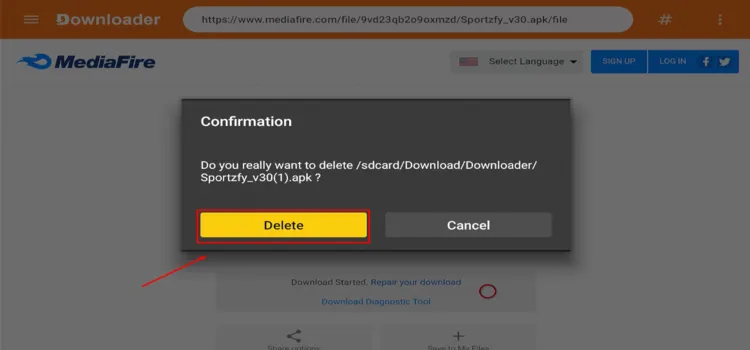
Confirm the file removal
How to Stream Live Sports Using Sportzfy
After installation, complete these basic steps before selecting a sports event.
Open Surfshark and connect to a suitable server for privacy.
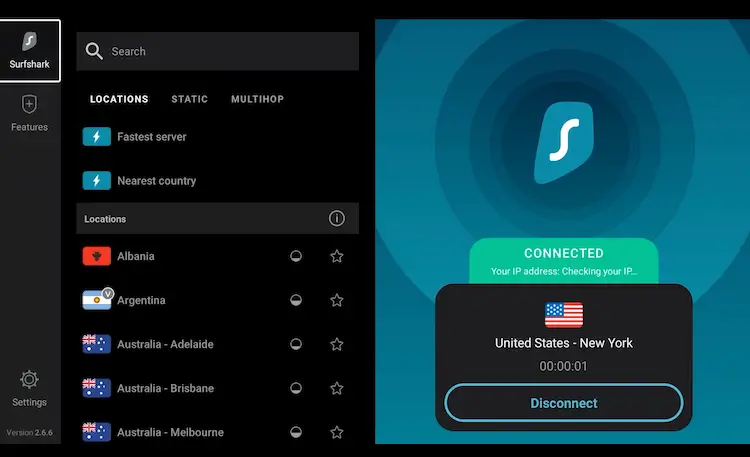
Connect Surfshark
Press the Home button, open Your Apps, and launch Sportzfy.
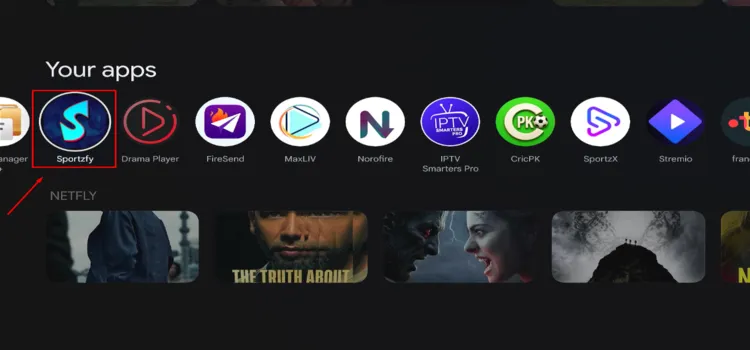
Launch Sportzfy
Select a sports stream of your choice.
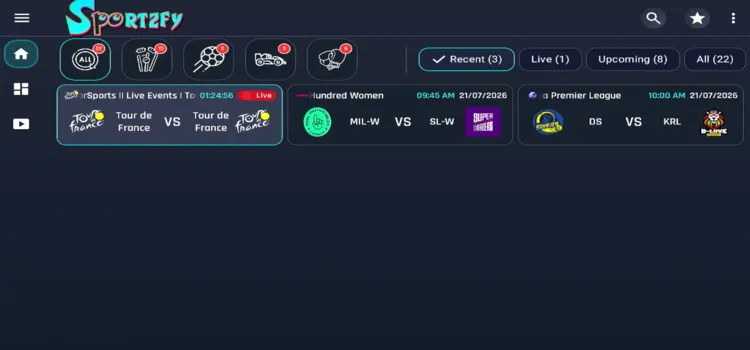
Select a sports stream
Enjoy streaming!

Sports Coverage
Category availability changes with events, source status, regional availability, and the installed APK release.
| Category | Common Content | Useful For |
|---|---|---|
| 🏏 Cricket | Live matches, schedules, scores, and highlights | International games and major domestic tournaments |
| ⚽ Football | League matches, cups, fixtures, and selected channels | Club football and international competitions |
| 🥊 Combat Sports | Boxing, wrestling, and selected fight events | Fight cards and event-night viewing |
| 🏎️ Motorsport | Racing events, calendars, and live coverage links | Formula racing and motorcycle events |
📌 Note: A listed event does not confirm broadcasting rights. Verify that viewing the stream is lawful in your location.
Sportzfy Features
The interface varies between releases, but current Sportzfy pages commonly describe these features:
- Live sports events and dedicated channels
- Upcoming and recently finished programs
- Support for M3U and Xtream Codes
- Match schedules, scores, and selected highlights
- No mandatory account on commonly distributed builds
- Full-screen playback on compatible TV devices
- Simple category-based navigation
Is Sportzfy Safe and Legal to Use?
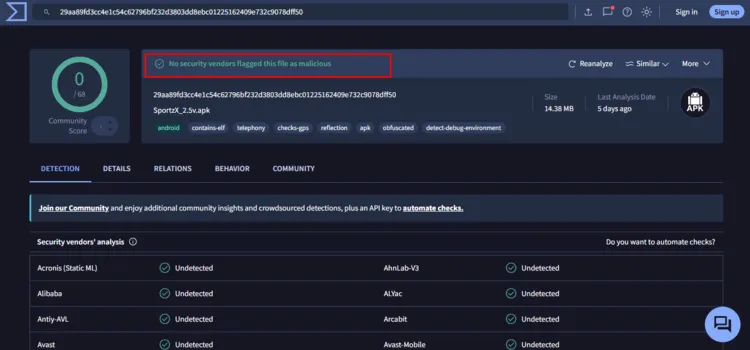
Sportzfy APK v2.5 returned a clean VirusTotal result, with no malware or known security threats detected. Based on this scan, the tested APK appears technically safe to install.
However, Sportzfy may provide live sports through unverified sources, and the legality of its streams can differ by country. A VPN can encrypt your connection and hide streaming activity from your ISP, but it doesn’t make unauthorized content legal.
FAQs
Q Is Sportzfy free on Onn TV?
Yes. Sportzfy is completely free and doesn’t require a subscription or paid account to access its interface and available streams.
Q Does Sportzfy require an account?
No. Most Sportzfy APK versions work without registration.
Q Does Sportzfy support external playlists?
Yes. Many recent builds include support for M3U playlists and Xtream Codes.
Q Should I use a VPN with Sportzfy?
A VPN such as Surfshark can improve privacy. It can’t grant content rights or legalize unauthorized streams.
Final Thoughts
Sportzfy is one of the more popular free sports streaming apps for Android-based devices, offering live matches, sports channels, fixtures, scores, and highlights through a simple interface.
It can be installed on an Onn TV Box/Stick through the Downloader app and opened without creating a standard user account.
Using Surfshark VPN is our top choice adds privacy while you stream — just stick to sports content you’re authorized to watch.
📌 Found this guide useful? Share it with a fellow sports fan and drop a comment below. Check out our Best Apps for Onn TV guide for more streaming options.
